


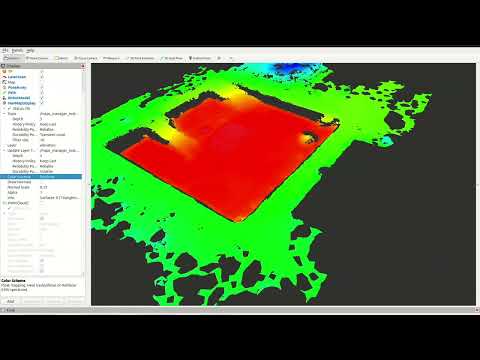
NavMap is an open-source C++ and ROS 2 library for representing navigable surfaces for mobile robot navigation and localization. Unlike classic grid-based maps, NavMap stores the environment as triangular meshes (NavCels), enabling efficient queries and multi-surface environments (e.g., multi-floor buildings).
- Triangular cell mesh representation with adjacency relations.
- Dynamic runtime layers: per-cell or per-vertex attributes (occupancy, elevation, cost, traversability, etc.).
- Locate API: find the NavCel under/around a 3D position using BVH acceleration and raycasting.
- Raytracing: Möller–Trumbore intersection with a simple BVH for efficiency.
- Multi-surface support: naturally supports multiple disconnected surfaces (e.g., separate floors).
This repository is organized into several ROS 2 packages:
-
navmap_core/
Core C++ library implementing NavMap. Minimal dependencies (Eigen3). -
navmap_ros/
ROS 2 conversions and message definitions:navmap::NavMap↔navmap_ros_interfaces::msg::NavMapnav_msgs::msg::OccupancyGrid↔navmap::NavMap
-
navmap_rviz_plugin/
RViz2 plugin for visualization of NavMap messages:- Displays surfaces and layers.
- Optional per-cell normal rendering.
- Layer-based coloring.
-
navmap_tools/
Tools and utilities for building and testing NavMaps (mesh import/export, conversions, etc.) -
navmap_examples/
Practical examples demonstrating the usage of NavMap, both core C++ API and ROS 2 integrations.
NavMap can be built as a standalone C++ library or within a ROS 2 workspace.
# Clone into your ROS 2 workspace
cd ~/ros2_ws/src
git clone https://github.com/<your-org>/NavMap.git

# Build
cd ~/ros2_ws
colcon build --packages-up-to navmap_core navmap_ros navmap_rviz_plugin navmap_tools navmap_examples

# Source workspace
source install/setup.bash- C++23 compiler
- Eigen3
- ROS 2 (tested with Humble, Iron, Jazzy)
- RViz2 (for the visualization plugin)
- PCL (for mesh construction utilities)
This section shows small, self-contained snippets that demonstrate how to create a NavMap, add geometry, attach layers, query values, and locate the triangle (NavCel) corresponding to a 3D position.
Note: After modifying geometry (vertices, triangles, or surfaces), always call
rebuild_geometry_accels()before performing queries such aslocate_navcel()orraycast().
#include <navmap_core/NavMap.hpp>
#include <Eigen/Core>

using navmap::NavMap;
using navmap::NavCelId;

NavMap nm;

// Create a surface
std::size_t surf_idx = nm.create_surface("map");

// Add 4 vertices of a unit square (z=0)
uint32_t v0 = nm.add_vertex({0.f, 0.f, 0.f});
uint32_t v1 = nm.add_vertex({1.f, 0.f, 0.f});
uint32_t v2 = nm.add_vertex({1.f, 1.f, 0.f});
uint32_t v3 = nm.add_vertex({0.f, 1.f, 0.f});

// Add 2 triangles
NavCelId c0 = nm.add_navcel(v0, v1, v2);
NavCelId c1 = nm.add_navcel(v0, v2, v3);

// Assign them to the surface
nm.add_navcel_to_surface(surf_idx, c0);
nm.add_navcel_to_surface(surf_idx, c1);

// Build normals, adjacency, BVH, etc.
nm.rebuild_geometry_accels();// Add a layer of type float called "cost"
auto cost = nm.add_layer<float>("cost", "Traversal cost", "" , 0.0f);
// Assign values to each triangle
nm.layer_set<float>("cost", c0, 1.0f);
nm.layer_set<float>("cost", c1, 5.0f);double v = nm.layer_get<double>("cost", c0); // → 1.0size_t surf_idx;
NavCelId cid;
Eigen::Vector3f bary, hit;
bool ok = nm.locate_navcel(Eigen::Vector3f(0.5f, 0.5f, 0.1f),
surf_idx, cid, bary, &hit);
if (ok) {
std::cout << "Point belongs to surface " << surf_idx
<< ", NavCel " << cid
<< " with barycentric coords " << bary.transpose() << std::endl;
}double val = nm.sample_layer_at("cost", Eigen::Vector3f(0.2f, 0.8f, 1.0f), -1.0);
if (!std::isnan(val)) {
std::cout << "Cost at (0.2,0.8) is " << val << std::endl;
}If the layer does not exist or the position cannot be located, the fallback value (-1.0 here) is returned.
NavCelId hit_cid;
float t;
Eigen::Vector3f hit_pt;

bool hit = nm.raycast(
  Eigen::Vector3f(0.5f, 0.5f, 2.0f),   // origin
  Eigen::Vector3f(0.0f, 0.0f, -1.0f),  // direction
  hit_cid, t, hit_pt);

if (hit) {
  std::cout << "Ray hit NavCel " << hit_cid
            << " at " << hit_pt.transpose() << std::endl;
}You can set values over regions of the map using shapes such as circular or rectangular areas:
// Add an occupancy layer
nm.add_layer<uint8_t>("occupancy", "Occupancy", "%", 0);

// Mark a circular area at (0.5,0.5) with radius 0.3
nm.set_area<uint8_t>(Eigen::Vector3f(0.5f, 0.5f, 0.0f),
                     (uint8_t)254,
                     "occupancy",
                     navmap::AreaShape::CIRCULAR,
                     0.3f);

// Mark a rectangular area centered at (0.8,0.2)
nm.set_area<uint8_t>(Eigen::Vector3f(0.8f, 0.2f, 0.0f),
                     (uint8_t)200,
                     "occupancy",
                     navmap::AreaShape::RECTANGULAR,
0.35f);Conversion functions are provided in navmap_ros:
#include <navmap_ros/conversions.hpp>
#include <navmap_ros_interfaces/msg/nav_map.hpp>

// Convert to ROS message
navmap_ros_interfaces::msg::NavMap msg = navmap_ros::to_msg(nm);

// Convert back to core structure
navmap::NavMap nm2 = navmap_ros::from_msg(msg);NavMap supports saving and loading using YAML + mesh files:
#include <navmap_ros/map_io.hpp>

// Save NavMap to disk
navmap_ros::saveMapToFile(nm, "/tmp/navmap.yaml");

// Load NavMap from disk
navmap::NavMap nm3 = navmap_ros::loadMapFromYaml("/tmp/navmap.yaml");For advanced control you can still access internal data directly:
// Access vertex positions
Eigen::Vector3f v = nm.positions.at(0);

// Iterate over NavCels
for (const auto & cel : nm.navcels) {
  Eigen::Vector3f centroid = nm.navcel_centroid(&cel - &nm.navcels[0]);
  std::cout << "NavCel area: " << cel.area
            << " centroid: " << centroid.transpose() << std::endl;
}In addition to the snippets above, the repository provides the package navmap_examples with ready-to-run executables.
colcon build --packages-select navmap_examplesIf your navmap_core / navmap_ros do not yet export CMake targets, you can provide include paths:
colcon build --packages-select navmap_examples --cmake-args -DNAVMAP_CORE_INCLUDE_DIR=~/ros2_ws/src/NavMap/navmap_core/include -DNAVMAP_ROS_INCLUDE_DIR=~/ros2_ws/src/NavMap/navmap_ros/includeDisable ROS 2 examples:
colcon build --packages-select navmap_examples --cmake-args -DBUILD_ROS_EXAMPLES=OFFros2 run navmap_examples 01_flat_plane
ros2 run navmap_examples 02_two_floors
ros2 run navmap_examples 03_slope_surface
ros2 run navmap_examples 04_layers
ros2 run navmap_examples 05_neighbors_and_centroids
ros2 run navmap_examples 06_area_marking
ros2 run navmap_examples 07_raycast
ros2 run navmap_examples 08_copy_and_assignEach demonstrates a different feature: geometry creation, multi-surface, U8/F32 layers, centroids and neighbors, area marking, raycasting, and copy/assign semantics.
If BUILD_ROS_EXAMPLES=ON:
ros2 run navmap_examples 01_from_occgrid
ros2 run navmap_examples 02_to_occgrid
ros2 run navmap_examples 03_save_load
Or via launch:
ros2 launch navmap_examples navmap_to_occgrid.launch.pyNavMap provides unit tests with GTest. To run them:
colcon test --packages-select navmap_core navmap_ros
colcon test-result --verboseContributions are welcome! Please open issues and pull requests on GitHub.
Before submitting code, run the linters and tests:
colcon test
ament_lint_autoThis project is licensed under the Apache 2 License.
See the LICENSE file for details.
Developed at the Intelligent Robotics Lab (Universidad Rey Juan Carlos).
Part of the Easy Navigation (EasyNav) project.

