AI-Ready Context Generation for Your Codebase
Features • Tech Stack • Getting Started • Usage • Architecture





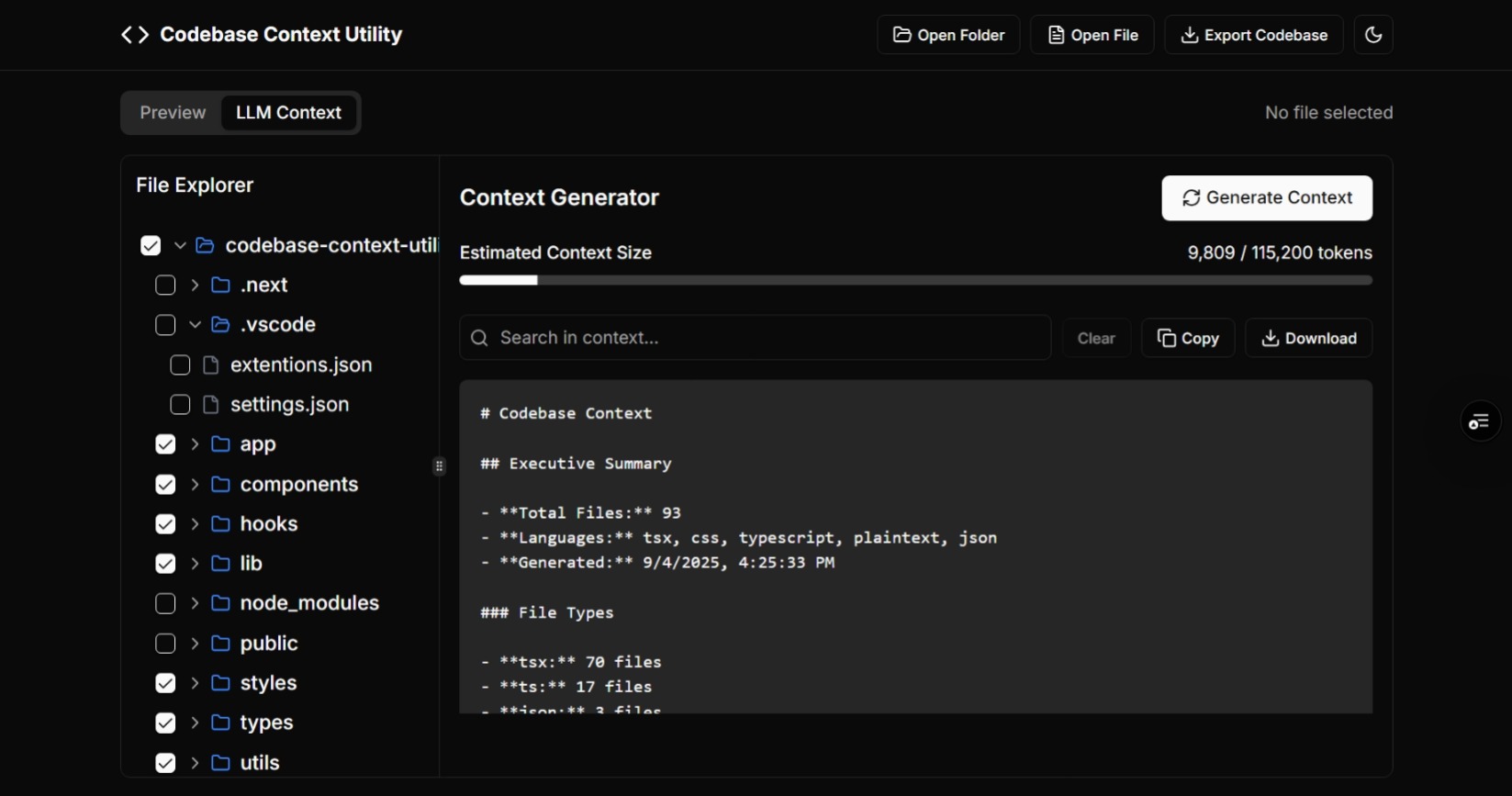
Codebase Context Utility is a developer-first tool that transforms entire codebases into LLM-ready context for AI-assisted workflows.
It provides deep file system integration, dependency mapping, and token-aware exports to make working with large projects seamless. 🚀
- 📁 File System Integration: Select folders locally with native FS access
- 🖱️ Drag-and-Drop Interface: Quickly add files and folders to your workspace
- 🧠 Smart Context Generation: Create optimized context chunks for GPT and other LLMs
- 📊 Multiple Export Formats: JSON, Markdown, Plaintext output options
- 🔍 Code Analysis: AST parsing, language detection, syntax-aware insights
- 📈 Token Estimation: Calculate token usage per model/provider
- 🎯 Dependency Mapping: Visualize relationships between files and modules
- ⚡ Architecture Visualization: Generate project-wide architecture diagrams
- 🔧 Advanced Filtering: Include/exclude via glob patterns, extensions
- 🌗 Modern UI: Responsive design, dark/light themes, keyboard shortcuts
- Frontend: Next.js 15 (App Router), React 19, TypeScript 5
- Styling: Tailwind CSS v4, Radix UI, Shadcn/ui, Lucide React Icons
- Code Analysis: Babel Parser, AST Traversal, custom token estimator
- File System: File System Access API, Drag & Drop API
- State Management: React Context + Custom Hooks
- Utilities: React Resizable Panels, React Hook Form, clsx
- DX: ESLint, PostCSS, Autoprefixer, pnpm/npm
- Node.js: 18+
- Package Manager: npm 9+ / pnpm
- Browser: Chrome/Edge/Brave with File System Access API
git clone https://github.com/DigitalHerencia/CodebaseContextUtility.git
cd CodebaseContextUtility
npm install
npm run dev
Open http://localhost:3000 to start analyzing your codebase.
# Start development server
npm run dev

# Build for production
npm run build

# Start production server
npm start

# Run linting
npm run lint- Click "Open Directory" to select a local folder
- Or drag and drop files/folders into the interface
- Use the file tree to navigate your project structure
- Set file extension filters (js, ts, tsx, py, etc.)
- Configure exclude patterns (node_modules, .git, dist)
- Adjust token limits and export preferences
- Select your preferred output format (JSON/Markdown/Plain Text)
- Click "Generate Context" to create LLM-ready analysis
- Export or copy the generated context for use with AI tools
- View dependency relationships between files
- Generate architecture overviews
- Estimate token counts for different LLM models
- Filter and customize output based on your needs
The utility processes your codebase through several intelligent stages:
- File System Scanning: Recursively analyzes directory structure
- Content Processing: Reads and parses file contents with language detection
- Dependency Mapping: Identifies imports, exports, and inter-file relationships
- Metadata Extraction: Gathers file statistics, sizes, and structural information
- Context Assembly: Combines all data into coherent, LLM-optimized format
- Token Optimization: Applies limits and formatting for target LLM models
- Branch Names:
feature/xyz,fix/abc,docs/xyz - Commit Format: Conventional commits with clear, descriptive messages
- Code Quality: ESLint for code standards, TypeScript for type safety
- UI Components: Consistent usage of Shadcn/ui component library
- Responsive Design: Mobile-first approach with Tailwind CSS
MIT License. See LICENSE for details.
Codebase Context Utility – Empowering AI-Assisted Development 🧠✨