Enabling export of multiple instances#12
Conversation


I've added the $instance parameter to a few Cmdlets and updated the logic of the Export code so we get the manifest folder path and look for each one of the instances manifest json files and create a folder for each instance that will be exported inside the exportFilePath people provide when running the script. Also updated the logging so it's friendly to users enough to understand where the script is at at any point in time.
The images were not updated yet. I'll do it using the github web version. More commits should be coming to update the readme images
Updating images and texts explaining the possibility of exporting multiple instances in a single run of InstanceExport script
 fredrodlima
added
documentation
fredrodlima
added
documentation


| [Parameter(Mandatory = $true)][String]$logLevel, | ||
| [Parameter(Mandatory = $true)][String]$currentDate | ||
| [Parameter(Mandatory = $true)][String]$currentDate, | ||
| [Parameter(Mandatory = $true)][String]$instance |
There was a problem hiding this comment.
I've added the $instance parameter so we could create different folders for each exported instance as well as update log texts and messages appropriately
There was a problem hiding this comment.
Dropped the $instance parameter in the Log and CreateDirectoryIfNotExits so the log is saved in the exportFilePath and has content for all instances that are exported
| if ($manifestFilePathExists) { | ||
| $manifestFilePath = $manifestFilePath.TrimEnd('\') # Trim any trailing backslash if it exists | ||
|
|
||
| $manifesJsonFiles = Get-ChildItem -Path "$manifestFilePath\*" -Include "*.json" |
There was a problem hiding this comment.
This is the most important change in the script where we are getting all the .json files inside the manifestFilePath provided and running a foreach to export each one of the instances we would like to export in a single run of the script
|
|
||
| foreach ($manifestFile in $manifesJsonFiles) { | ||
|
|
||
| $manifestFileExists = Test-Path -Path $manifestFile |
There was a problem hiding this comment.
From here is basically the same code we previously had for a single instance export. Just a few simple and small changes, nothing fancy to highlight if you see the changes hiding whitespaces
|
|
||
| $manifestFileExists = Test-Path -Path $manifestFile | ||
|
|
||
| $instance = ($manifestFile.BaseName -split ' ')[0] |
There was a problem hiding this comment.
Here we are getting the instance name from the BaseName of a given manifest json file. We should recommend users to not edit the name of the files we provide in order to things run smoothly for them.
There was a problem hiding this comment.
Each manifest has subdomain inside of it... probably better to use that than trust the filename
| `Windows PowerShell` usually comes installed with Windows. It uses the `PowerShell 5` version as you can see from the image below: | ||
|
|
||
| 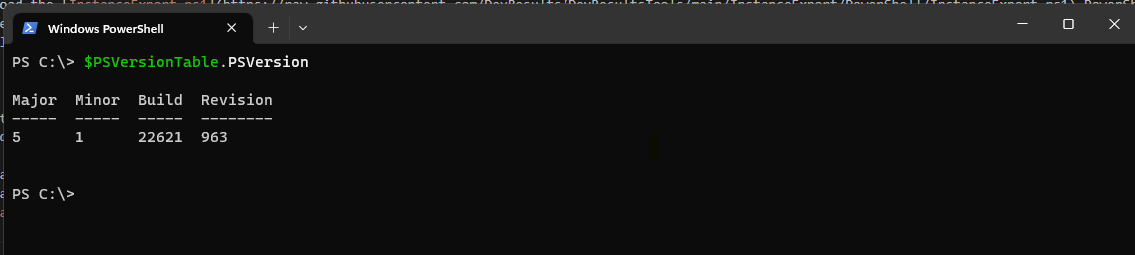 | ||
|  |
There was a problem hiding this comment.
In case you want to see the images please go to the README.md file in the enabling-exporting-multiple-instances branch
fredrodlima
changed the title
 bigdogwillfeed
left a comment
bigdogwillfeed
left a comment
bigdogwillfeed
left a comment
There was a problem hiding this comment.
This works to export multiple instances at once, assuming:
- user enters the correct values at each prompt (see below for unhandled edge cases)
- user has access to each of the multiple instances with the same username and password (I'm not sure how common that is, and certainly won't be the case if any instance has forced SSO login)
One additional concern I have is that the single instance export has certainly been the most common usage thus far, and I expect that to continue to be the case. Now the script enforces additional complexity to handle the case where the user wants to export multiple instances at once.
I haven't been part of the conversation on these changes, so apologies if it's already been considered, but I have two suggestions for paths forward:
- check the manifest path as provided. If it's a json file, export just that one file as before. If it's a folder, let the user know that you'll use each of the json files in that folder (perhaps listing the files that you will use or the number found or something). This keeps the experience simple for the simple case, and users don't need to do the additional folder setup for a single export.
- leave this script untouched, and use a separate script for exporting multiple instances. Each loop of the new script would invoke
InstanceExport.ps1providing as many of the required inputs as possible -- this would support using separate credentials for each instance.
I'm happy to support whichever direction you choose on this. If you choose to keep this approach, I suggest cleaning up the error handling to cover the issues below
|
|
||
| $manifestFileExists = Test-Path -Path $manifestFile | ||
|
|
||
| $instance = ($manifestFile.BaseName -split ' ')[0] |
There was a problem hiding this comment.
Each manifest has subdomain inside of it... probably better to use that than trust the filename
| $displayMsg = "An error occurred when looking for manifest folder" | ||
| Log -msg "Error in finding manifest folder" -displayMsg $displayMsg -logLevel "error" -currentDate $currentDate |
There was a problem hiding this comment.
this is displayed if the manifest file doesn't exist, which 1) is confusing, because it's a file not found but the message says folder and 2) should rarely happen because we're iterating over the list of json files in the folder to begin with.


|
I see that it worked for NG but I got this: In general I think NG's right that this is probably a one-off case (Chemonics), at least for the foreseeable future, but worth the one-off given the scope of their portfolio. I'd support either a separate script or a "file or folder?" change to the existing script, whatever seems best, to avoid disrupting everyone else who is not Chemonics going forward. |


Also adding code to check if the manifestFilePath is a json file or it's a folder. If it's a json file it runs smoothly as before and if it's a folder try to find as many as manifests that are available there. Also updating $instance value to be coming from the subdomain and not relying in the manifest file name.

Thanks for your great review and points noted in the tests. I've updated the script to follow the pattern |
| [Parameter(Mandatory = $false)][String]$displayMsg, | ||
| [Parameter(Mandatory = $true)][String]$logLevel, | ||
| [Parameter(Mandatory = $true)][String]$currentDate, | ||
| [Parameter(Mandatory = $true)][String]$instance |
There was a problem hiding this comment.
The $instance parameter was removed here
| param ( | ||
| [Parameter(Mandatory = $true)][String]$directoryPath, | ||
| [Parameter(Mandatory = $true)][String] $currentDate, | ||
| [Parameter(Mandatory = $true)][String] $instance |
There was a problem hiding this comment.
The $instance parameter was removed here
| $manifesJsonFiles = Get-ChildItem -Path "$manifestFilePath\*" -Include "*.json" | ||
|
|
||
| foreach ($manifestFile in $manifesJsonFiles) { | ||
| if (!$target.PSIsContainer) { |
There was a problem hiding this comment.
This checks if the manifestFilePath is not a container (a file) and if yes it follows the previous script flow. Otherwise we follow the updated pattern (with a provided folder)
Updating README.md file to explain the normal flow for a single instance export and the new flow for multiple instances export flow
| foreach ($manifestFile in $manifesJsonFiles) { | ||
| if (!$target.PSIsContainer) { | ||
| $manifestJson = Get-Content -Raw -Path $manifestFilePath | ConvertFrom-Json | ||
| $instance = $manifestJson.subdomain |
There was a problem hiding this comment.
$instance now is using subdomain from json file
| if ($manifestFileExists) { | ||
| $manifestJson = Get-Content -Raw -Path $manifestFile | ConvertFrom-Json | ||
|
|
||
| $instance = $manifestJson.subdomain |
There was a problem hiding this comment.
$instance now is using subdomain from json file
So we call it either for the single instance scenario or multiple instances scenario and simplifies the reading a bit
…es' into enabling-export-multiple-instances
| } | ||
|
|
||
| $directoryPath = $exportFilePath + "/" + $instance | ||
| try { |
There was a problem hiding this comment.
These lines were being duplicated here (single instance scenario) as well as in the multiple instances scenario. So, I've went ahead and created the ExportInstanceData function so we don't have it repeated here and have a new Function to handle that
| $msg = "Manifest file path doesn't contain valid json file(s)." | ||
| Log -msg $msg -displayMsg $msg -logLevel "error" -currentDate $currentDate | ||
|
|
||
| $msg = "Exporting Instance script run finished with errors." |
There was a problem hiding this comment.
Improving a tiny bit the Log here so users are aware that an error has occurred in their script run

 reidmporter
left a comment
reidmporter
left a comment
reidmporter
left a comment
There was a problem hiding this comment.
Looks good to me! Got it to work just fine.

This way, if a user can't sign in to one of several instances, the logs will clearly show which instance was the problem

bigdogwillfeed
left a comment
bigdogwillfeed
left a comment
There was a problem hiding this comment.
👍🏼 Nice! This works well, and I think the support of either single manifest file or folder of manifest files is a good choice. One thing I like about this approach is that the log file contains the entire run (rather than one log per instance)
Not a blocker by any means, but some feedback for the future: There's a bit of repetition (and difference) in the Export function on either side of the "is this a file or folder" branch. The script would be a little easier to maintain if an export of one manifest file was handled by the exact same code (and called once in the single-file version, or in the loop in the folder version)
3 participants


Solves
This PR updates the
InstanceExportscript and the documentation onREADME.mdin order to enable that users can export more than one instance data in a single run of the script with the caveat that a given user should be added asOwneron each one of the instances they will have the manifest.Description
When we created the
InstanceExporttool we did a good job on allowing users to export a single instance when running it. We failed though to consider that we have some clients that may have multiple instances and the burden of running one by one would be a considerable effort.I took a peak in order to update the script and allow that we could export more than one instances a given user has access to. I've tested in my tests with a
Tech admin (us)users and users in theOwnersgroup because I believe they will have the best set of permissions to be able to export everything successfully and with fewer possibility of facing any issues in the process.When updating the script I've added a new parameter
$instancefor a few of the internal Cmdlets we've defined inInstanceExportso we would get the$manifestFilePath(a folder where users would save a manifest file or more than one manifest file) in order to export one or more instances in a single run of the script. Things should work pretty similar on how they used to work before the changes and how users that already used the tool will only have one different step (which is create amanifestfolder) in their workflows which should be easy enough for them (I guess).How To Test
0 - Open
DevResultsproject onmainbranch1 - Make sure you build the site and run it
2 - Log in as Tech admin in a local instance
3 - Go to
Userspage4 - Select a user in the
Ownersgroup for that site5 - Make sure to copy the selected user email in a Notepad (you will need later)
6 - Follow the password reset flow so you create a new password for that user (in case you don't know it already)
7 - Log in as that user in the local instance
8 - Open another tab and go to another local instance
9 - Log in as you Tech admin user
10- Make sure the Tech admin user can
Editon that instance11 - Go to
Userspage and add the user you've chosen on step 4 and using email saved on step 512 - Log in as that user in this other local instance
13 - Log out of both instances as the chosen user
14 - Log in as your Tech admin user on both instances
15 - Go to
Instancespage and download manifests file for each one of the instances16 - Finally, go to
DevResultsToolsrepo and copy theInstanceExport.ps1from theenabling-export-multiple-instancesbranch17 - Save the
InstanceExportscript in a folder in your machine18 - Create a manifest folder in the same folder you've saved the
InstanceExportscript19 - Open a
PowerShellwindow. Here I recommend that you use PowerShell 7 but it might work if you useWindows Power Shelltoo20 - Navigate to the directory you've saved the
InstanceExportscript21 - Trigger the export using
.\InstanceExport22 - Follow the prompts providing the
manifestfolder23 - The
exportFilePath24 - The chosen user login and password (with Owner permissions)
25 - Wait and see that data will be exported
26 - Check that a folder for the
exportFilePathwas created and inside you see two folder one for each instance27 - Go inside each one of the folders and check the sub-folders and the log file and that they do make sense to you from what you've seen in your PS script logs in the command line.
28 - In the
manifestfolder delete move the all manifests to a different folder29 - Try to run the script again and make sure you got an error and creates a folder in the provided
exportFilePathwith a log file30 - Try to run the script again and provide in the
manifestFilePaththe path for one of the manifests you've download and make sure it runs without issues as the usual flow forsingleinstance exportVerifications:
Submitter:
Data Reviewer:
Engineer Reviewer: