Patch for playing world record games in Black Ops II Zombies. Made based on community decision to create an official community patch from March 2023. What makes this patch stick out from among countless patches that have come before it, is focus on optimization, stability, and user freedom. Stuff like box, fridge overrides or characters are fully optional and invoked in-game by the players.
Patch has already proved itself in multiple top games, including, but not limited to:
- Town 100 No Jug WR by Slewya
- Town 29:14 30sr WR by TheBrokenHead115
- Die Rise 120 coop WR by Issuez & NoMoleMan
- Mob of the Dead 31:09 30sr WR by Becca
- Buried 255 WR by Blasteress
- Buried 210 coop WR by Blasteress & notway
- Buried 150 No Power coop WR by Astrox & Nessquik
- Origins 173 WR by Vengiix
- Origins 131 coop WR by DestroyeR and NoMoleMan
Please inform me about any issues you may encounter with the patch, so they can be fixed, preferably with decent amount of information in what circumstances an issue occured. The main channel for issues is GitHubs Issues section, although it won't hurt to ask about it on Discord first
I'm currently the sole developer for B2OP, but the person making almost all important decisions is Astrox. The best way to talk to both of us about the patch is joining the Discord from the link above and talk in the dedicated B2 section
Before reporting a problem, please check out the FAQ section down below, you may find answers you're looking for there
Also check out a B2 website with useful tools and data
This patch is meant to be used during games of Highrounds, No Powers & Round Speedruns. Below you can see alternatives for other categories
| Category | Patch | Creator | Link |
|---|---|---|---|
| First Room | B2FR | Zi0 | GitHub |
| EE Speedrun | Easter Egg GSC Timer | HuthTV | GitHub |
| Song Speedruns | B2SONG | Zi0 | GitHub |
Tip
For World at War you can check Evelyn's community patch
Tip
For Black Ops I you can check Evelyn's CT5 mod, in that game patching is NOT allowed, however you can use a plugin (which is similar as you'd use a tool like TIM or LiveSplit with game hooks)
Tip
For Black Ops III you can check oJumpy's community patches
Since version 2.0, all scripts that are meant to be used by players are available in releases section. Downloading raw code from code section will not work!
Tip
I've created a video on how to install these patches in case instructions here are unclear
Warning
Redacted and Ancient Plutonium versions are now DEPRECATED. It means they're no longer guaranteed to receive new features and in the future I'll stop supporting them completely. Black Ops II is at the stage where by using older launchers for record games is pointless and is reducing the competitive integrity of the community, and maintaining the patch for 4 versions (realistically 2905 is already quite different from live) is an extra overhead. End of life time for these versions isn't currently set in stone, from my perspective the sooner the better. Currently planning it for the next major release.
Caution
Whenever there's a new major patch release (eg. 2.* to 3.0 or 3.* to 4.0), please note that a lot of internal logic changes, therefore stability may not be up to the full standard. While we recommend you update your patch as we fix issues and add new features, we acknowledge increased risk with new major versions, which is why we usually leave most recent release of last major version in releases for some time, so players can access it until new version was battletested and issues have been fixed. We appreciate early adopters, who by reporting any problems help us provide the stable experience.
Download script b2op-plutonium.gsc from releases section, and put it in your Plutonium folder, by default it's located in:
%LOCALAPPDATA%\Plutonium\storage\t6\raw\scripts\zm
Tip
You can press WIN + R on your keyboard and paste this string there. Assuming you haven't changed any Plutonium paths, directory with scripts should open right away.
Warning
Prior to patch version 4.0, the directory we recommended here was Plutonium\storage\t6\scripts\zm (the only difference is that raw folder in the middle), you should still use that directory if you want to use the patch in 2905. On modern Plutonium, it is recommended to start using the new location (remove the patch you currently have in the old location and place the updated version in the new directory specified above)
For previous versions, network frame fix script was separate, but now it is built into the patch version for Plutonium (for this reason make sure not to use version for Redacted or Ancient on Plutonium)
Download script b2op-redacted.gsc from releases section, and put it in script folder in your Redacted directory.
.\data\scripts
Warning
Please do not use fast_restart on Redacted, as the patch will not load afterwards. It can also cause the game to just crash outright.
To install, download b2op-ancient.zip from releases section, and inject it the same way as other patches for Ancient. Do note, zip contains a directory structure and filename that you're suppose to inject without changing it, so far people always injected files called _clientids.gsc, but in this case it would not work.
Caution
I have found a way of "fixing" the problem with network frame on Ancient Plutonium. In order to do that i need to ship B2OP for that launcher alongside existing 3arc code, which we obtained by decompiling game scripts. Because of it, they many not 100% reflect the proper game logic, we believe it's accurate but it's only as good as the decompiler. Because of that fact, I CAN NOT guarantee the game integrity to the extent i can do that with other versions of this patch, use at your own risk!
Tip
Ancient Plutonium injection oftentimes fail, it can sometimes take multiple attempts to successfully inject. A good indicator is, after an injection try to open the console, if it opens the patch has been injected.
A high level overview what features are available in each of the versions.
| Feature | Plutonium | Plutonium (2905) | Redacted | Ancient |
|---|---|---|---|---|
| Plutonium anticheat integration | ✓ | ✗ | ✗ | ✗ |
| Basic anticheat | ✓ | ✓ | ✓ | ✓ |
| Network frame fix | ✓ | ✓ | ✗ | ✓ |
| Automatic Permaperks & Bank | ✓ | ✓ | ✓ | ✓ |
| Backspeed (with option to adjust) | ✓ | ✓ | ✓ | ✓ |
| Trap / JetGun fix | ✗ | ✓ | ✓ | ✓ |
| HUD timers | ✓ | ✓ | ✓ | ✓ |
| HUD buildable counter | ✓ | ✓ | ✓ | ✓ |
| HUD visibility toggling | ✓¹ | ✓¹ | ✓¹ | ✓¹ |
| Showing time splits on key rounds | ✓ | ✓ | ✓ | ✓ |
| Customizing key rounds for time splits | ✓¹ | ✗ | ✗ | ✗ |
| First Box (configurable) | ✓ | ✓ | ✓¹ | ✓¹ |
| Fridge weapon (configurable) | ✓ | ✓ | ✓¹ | ✓¹ |
| Characters & Viewmodels (configurable) | ✓ | ✓ | ✓ | ✓ |
| Simple trade tracker | ✓ | ✓ | ✓ | ✓ |
| FPS Limiter | ✓ | ✓ | ✓ | ✓ |
| DOF Disabled | ✓ | ✓ | ✓ | ✓ |
| Toogleable Purist no jug mode | ✓ | ✓ | ✓ | ✓ |
- Configuration only as host
Starting on Plutonium version R4516, the launcher is able to show checksum of each of the patches you have as well as the entire game memory (i'm massively oversimplifying here, geeks give me a break). Here as an article about what a checksum is. Every file has a different signature, and changing as much as a single letter in the patch changes it's signature entirely.
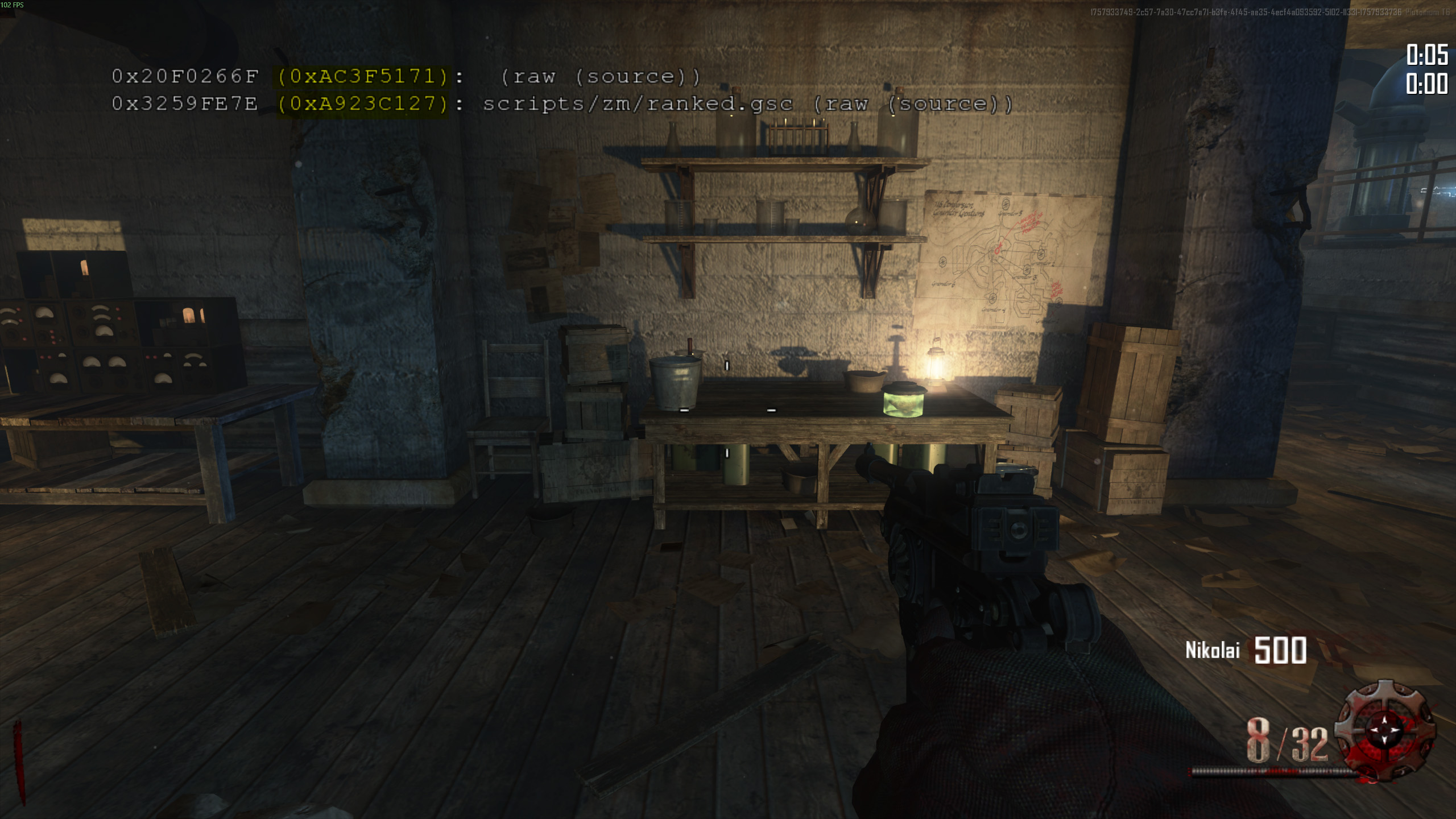
As you can see on the screenshot above, each of the GSC files you have loaded into the game is listed by the game. Occurance of this data is navigated by cg_flashScriptHashes DVAR (do not worry, the patch will set this DVAR for you automatically, no action required).
Each line represents a different GSC file. At the beginning there are 2 checksums, we're using the 2nd one in parenthesis for validation (the highlighted one). Afterwards comes the file name (if the patch is not compiled) or (raw (source)) if patch is compiled. In case of B2OP it'll be the latter. You may use tool mentioned here to validate the file using that checksum.
Note
Checksums on the screenshots are used for example purposes, they're not representative of currently valid GSC files, do not use those values for validation.
Again, i use this term to help people understand the concept, please do not get mad. Those are checksums generated from the game memory and represent the factual state of your game. This is a combination of patches/mods you loaded and internal game stuff. Those can only be generated by the game and whether or not they'll be useful for checking legitimacy is to be seen. They are not part of this screenshot and are managed by a different DVAR cg_drawChecksums (also managed by the patch).
Checksum of each new B2 patch version will be attached to the release, which will allow you to verify whether a valid patch is used yourself. In terms of what the patch do, it force enables displaying those checksums certain rounds (details on that below). They are only shown for few seconds and not on milestone rounds (to not ruin screenshots etc.)
I've created a tool for doing just that, type in the checksum (one highlighted on the screenshot above) and press Check. If checksum is registered in the system, you'll see all the relevant details about the file. Altenatively, you can drag the file itself into the page to see it's checksum (and details if the system has them).
You should expect checksums to be displayed at the end of following rounds (for version 3.3 onwards)
End of 18, 28, 38 onwards up to the end, and additionally
| Type of game | Start of additional displays |
|---|---|
| Survival Maps Solo | End of .3 rounds from 83 onwards |
| Survival Maps Coop | End of .3 rounds from 73 onwards |
| Survival Maps 3p/4p | End of .3 rounds from 63 onwards |
| Normal Maps Solo | End of .3 rounds from 153 onwards |
| Normal Maps Coop | End of .3 rounds from 103 onwards |
| Normal Maps 3p/4p | End of .3 rounds from 63 onwards |
- My game is restarting automatically, how do i fix it?
- You don't, that's intended behavior of the system that's giving you permaperks to prevent a rare bug where permaperks were not taken away from players sometimes. How it works is you load into the game, each player is scanned for missing permaperks, if anyone is missing something, they're awarded missing permaperks, and then the game will force a restart. After the restart you are free to carry on. Do note, most of the time you are going to lose some of the perks almost instantly, so restarts few minutes in will require the process to repeat. Since version 2.0, if you restart on round 1, the permaperk awarding system will not be initiated to prevent issues like infinite restarts on Tranzit, where players would kill a zombie too fast and game would just keep giving them perma headshot damage back.
- I put the patch in the right folder but it does not work
- Make sure you downloaded right version from releases section (do not download the zip file called Source code, it is added to the release automatically by github and contains raw code, that is not going to work). Failing to do so may result in the patch not working at all, or misbehaving, which in some situations can cause your game to not be legit. Always match names of released files with the launcher you're using. Read Installation instructions above.
- It says the patch gives players first box, which is not legit. How come this patch is deemed an official patch for BO2 records?
- That's because in order for weapons in the box to be changed, you have to explicitly execute the right command (or chat message, details below in Overriding box location section). If you don't do that, the box will remain untouched.
- Is there anything i need to worry about regarding legitimacy of my game while using this patch?
- Do not use First Box or Box Location modifiers while playing Highrounds, those are OK only for round speedruns (and other categories that explicitly allow it). Make sure you're using the correct version of the patch in relation to your launcher (for example, Redacted version will not fix Network Frame problem on Plutonium, etc.). Also do not use this patch for categories it's not meant for. I've linked alternatives to other categories in a table above in Categories section
- I heard this patch may cause early errors
- B2OP was built with optimizations for this kind of things in mind. But yes, technically any patch you load (even something so simple that has 5 lines of code and does only one thing) is an additional overhead for the game. From what we've seen so far from players using it, the patch does not directly contribute to any errors. One thing i can recommend is disabling HUD elements, because from what we've been able to measure, that has the biggest overhead from all of the things this patch does. See HUD section to check how to do that
- Why version for Ancient is so different
- Ancient has an internal bug that's causing something called network frame to have a wrong values on coop. What it does, is it's causing certain scripts to execute at different rates. In order to fix it on Ancient specifically, B2OP has to contain a big chunk of the 3arc code that it's replacing (alongside the function that has to be changed in order to fix the flawed network frame behavior). This is causing the file to be distributed as a zip (so you can extract the directory inside of it and it's ready for injection) and is noticeably bigger in size.
- What is a DVAR
- DVAR is a variable that player can (usually) modify from the game console. DVARs mentioned in this document are all changeable. In order to set a DVAR, press
~button, then type in dvar name, and value you want to assign to it, like so
cg_drawReset 1
- Network Frame Fix file is missing from this repository
- As it's not something i naturally expect players to use (B2OP includes that fix), i moved this file from this repository to this gist, so you can still use it if you for example develop your own BO2 script
- There is a bunch of text showing up on my screen while playing on Plutonium with this patch
- Yes, most of it is either Plutonium anticheat stuff that the patch triggers, or data about the game that is useful for both you the player and also people who watch/validate your game. Even tho it may look like a lot, the patch was built to show as little as possible while providing all important info.
- I'm getting an error about having 2 patches loaded at the same time.
- Plutonium have changed their go-to directory for scripts, but they maintain them for backwards compatibility. Try the following
- Check if you still have a
t6rfolder in your Plutonium directory, if so, just remove it (it's a leftover from earliest versions of Plutonium) - Check if you have anything in
Plutonium\storage\t6\scripts\zm, if so, just remove it. The patch should be inPlutonium\storage\t6\raw\scripts\zmalongsideranked.gscfile according to current Plutonium guidelines.
- Check if you still have a
- I want to play No Jug category without persistent jug
- There is a dedicated setting to it, a description can be found below, but tl;dr is send
purist 1chat message as a host and restart the map
- Make sure you're using correct and up to date version downloaded from releases section on this page.
- Remove other patches. B2 Plugins should not cause any issues, but if you are using any, for the sake of troubleshooting remove them as well.
- Check if the directory the patch is in is correct. Perhaps you have multiple instances of Plutonium or Redacted and you put it in the directory belonging to another instance.
The patch can be interacted with using DVARs and game chat commands. Below is a table listing all the options.
| DVAR | Chat message | Chat aliases | Chat command for host only | Feature description |
|---|---|---|---|---|
timers |
- | - | - | Set to 1 to show timers |
buildables |
- | - | - | Set to 1 to show buildables tracker |
kill_hud |
- | - | - | Set to 1 to premanently destroy HUD for the rest of the game to save allocations |
kill_box_tracker |
- | - | - | Set to 1 to premanently disable box tracker for the rest of the game |
viewmodel |
view |
!v |
No | Viewmodel swapping |
| - | char |
!c |
No | Character chat commands |
| - | splits |
!s |
Yes | Splits chat command |
| - | backspeed |
bs, !b |
Yes | Backspeed |
fridge |
fridge |
!fr |
No | Overriding fridge weapon |
fb |
fb |
!fb |
No | Overriding box weapon |
lb |
lb |
!lb |
No | Overriding box location |
| - | box |
!bt |
No | Basic trade tracker |
key |
key |
!k |
Yes | Overriding key location |
| - | tank |
!t, tank deptach |
Yes | Tank fix |
| - | purist |
!p |
No | No jug games |
| - | reticle |
!r |
No | Allows for customizing PaP'd gun reticle, values between 1 and 16 (eg. 16 is a red dot), 0 to make it random. Needs to be set BEFORE the gun is obtained |
| - | camo |
!ca |
No | Allows for customizing gun PaP'd camo, needs to be a valid index, you risk crashing if it isn't, use only if you know how to manage custom camos. Needs to be set BEFORE the gun is obtained |
All HUD elements are toogleable (with the exception of watermarks), below is the table with DVARs that can be used to hide and show them. Change DVAR state by invoking the in-game command line (~ button by default), enter name of the DVAR and value following the spacebar.
Tip
Disabling hud elements reduces variable allocations of the patch, so if you're a fan of optimizations, toggle all of these off by pasting following line into your console.
timers 0;splits 0;buildables 0
| HUD element | DVAR | Default |
|---|---|---|
| Timers | timers 0/1 |
Enabled |
| SPH print | splits 0/1 |
Enabled |
| Buildables HUD | buildables 0/1 |
Enabled |
You can also permanently disable all B2 hud for the entire game, which will additionally remove some allocations from the script itself. This shouldn't really be necessary, but for a situation where every single child variable counts it can be useful. To do that set the following DVAR
kill_hud 1
Warning
Once HUD is killed, you won't be able to re-enable it without restarting the game, normally just hiding it using the method shown above should be enough.
Prior to version 3.5 splits were not fully accurate. Starting on 3.5, B2OP emulates the logic used by original code to calculate the accurate red number moment (end of fade-in transition). Below is a table showing time difference for each split between the actual red number time and time displayed by split message.
| Round split | Offset (+ seconds) |
|---|---|
| 30 | -0.25 |
| 50 | -1.25 |
| 70 | -2.25 |
| 100 | -4.25 |
On Plutonium version R4516+ you can customize on which rounds splits are going to be shown, in order to do that
%localappdata%\Plutonium\storage\t6\raw\scriptdata
Or wherever your Plutonium is installed. If some part of this path is missing on your pc, just create empty folders.
Then proceed to create a b2op folder inside of scriptdata, create splits.txt file inside. You can specify all splits you want displayed there, for example, writing the following contents to the file, will cause splits to show on rounds 15, 18, 21, 24, 27 and 30.
15
18
21
24
27
30
As of B2OP version 4.4, you can set splits using chat messages as host. Under the hood, the patch will just overwrite contents of the file described above.
- To check current custom splits settings type
splitsin chat - To remove custom splits settings and revert to default, type
splits 0 - To define new set of custom splits, type
splits 2 3 4 5, which will cause the splits to show on rounds 2, 3, 4 and 5. Adjust round numbers accordingly
Warning
If the splits.txt file is not empty, default splits rounds used by the patch no longer apply, so you need to specify ALL of the rounds you want it to show up yourself.
Note
In a coop game, splits defined by the host player will apply to all players.
Warning
Splits customization (much like any other feature based on file IO) won't work if you have scr_allowFileIo dvar set to 0
This patch has the following capabilites regarding setup:
- Overriding weapon in the box (First Box Patch)
- Overriding starting box location
- Overriding weapon in the fridge (Fridge Patch)
- Overriding Mob of the Dead key position
Note
None of the modules specified above will do anything to your game, unless specific actions described in following sections are taken.
Tip
All 3 modules normally work by host inserting the correct DVAR in the console. However specifically in Plutonium (2905 and live versions) you can also do it via a chat message. Chat command is exactly the same as the console one, unless otherwise specified in the specific section below, this functionality allows offhost players to perform these actions as well.
On Plutonium you can invoke these commands without typing/copying them in every time by using binds. Binds need to be set in the bind config file.
Bind config default location
%localappdata%\Plutonium\storage\t6\players\bindings_zm.bdg
For example following bind will input the command fb mk2|galil after you press p
bind P "fb mk2|galil"
You can also add say in front of the command to make it output chat command for you
bind P "say fb mk2|galil"
Player is allowed to change box location until either round 11 or until box is used.
To change box location, a DVAR lb has to be set to the right value. Below is table with values that can be used to set the box.
| Map | DVAR value | Corresponding location |
|---|---|---|
| Town | dt |
Double Tap cage |
| Town | qr |
Quick Revive room |
| Nuketown | yellow |
Behind yellow house |
| Nuketown | green |
Behind green house |
| Mob of the Dead | cafe |
Cafeteria |
| Mob of the Dead | warden |
Warden's Office |
| Origins | 2 |
Generator 2 |
| Origins | 3 |
Generator 3 |
For example:
lb dt
Player is allowed to override weapons in the box until round 11, as long as he would be able to get specified weapon under normal conditions.
Note, in a coop game there are scenarios where first box could give players guns they shouldn't be getting, players are responsible for using the module responsibly. Here is an example of something like this happening.
Player can still get a teddy bear from the box, despite overriding the weapon. If that happens, weapon has to be set again after box appeared in the new spot.
To set weapon in the box, a DVAR fb bas to be set to the right value. Below is table with values that can be used to override weapon. It is also possible to put actual weapon code instead of the key below, assuming players know weapon codes.
| Weapon | DVAR value |
|---|---|
| Ballistic Knife | bk |
| Blundergat | blunder |
| EMP | emp |
| Monkeys | monk |
| Paralyzer | paralyzer |
| RayGun | mk1 |
| RayGun MK2 | mk2 |
| Sliquifier | sliq |
| Time Bomb | time |
| AK47 | ak47 |
| AK74u | ak74 |
| AN94 | an94 |
| B23R (wall) | b23r |
| B23R (box) | b23re |
| Chicom CQB | chic |
| Death Machine | dm |
| DSR50 | dsr |
| Executioner | exe |
| Fal | fal |
| Five-Seven | 57 |
| Five-Seven DW | 257 |
| Galil | galil |
| HAMR | hamr |
| KAP-40 | kap |
| KSG | ksg |
| LSAT | lsat |
| M1216 | m1216 |
| M1927 | tommy |
| M14 | m14 |
| M16 | m16 |
| M27 | m27 |
| M82A1 Barret | barret |
| M8A1 | m8 |
| MG08 | mg |
| MP5 | mp5 |
| MP40 | mp40 |
| MTAR | mtar |
| Olympia | oly |
| PDW57 | pdw |
| Python | pyt |
| Remington 870 | remington |
| RNMA | rnma |
| RPD | rpd |
| RPG | rpg |
| Saiga | s12 |
| Scar | scar |
| Skorpion EVO | evo |
| SVU AS | svu |
| Tommy Gun | tommy |
| Type 25 | type |
| War Machine | wm |
For example:
fb mk2
Additionally, players can chain multiple weapons via a single message with both methods, following example will yield the first box module triggering 3 times
fb mk2|monk|galil
Player is allowed to override weapons for himself and his team in the fridge until either round 11 or first use of the fridge. This functionality does not allow for inserting weapons that are not normally allowed to be put in the fridge by the game.
To override fridge weapon, a DVAR fridge has to be set to the right value.
Values from this DVAR can be seen above (in the Overriding box weapon section), but in order to put upgraded weapon in the fridge, a + has to be added in front of the weapon key.
Example for normal weapon:
fridge m16
Example for upgraded weapon:
fridge +m16
Example of player setting weapons for everyone (host only):
fridge all m16
Example of player setting upgraded weapons for everyone (host only):
fridge all +m16
Note
This feature is available only on Plutonium 4516+
Host can override key position on Mob of the Dead. Once changed, the setting persists across game launches as it's saved using stats system (much like character changing). After changing this setting, host must restart the game (as it's only read at the beginning of the game during the normal key spawning logic).
Set by DVAR or chat message, to set the key to be in Warden's Office, Cafeteria or randomized (default behavior) respectively
key warden
key cafe
key reset
Or while in main menu by directly modifying stats, use these commands
Cafeteria:
statwriteddl playerstatsbymap zm_prison weaponlocker clip 1;uploadstats
Warden's Office
statwriteddl playerstatsbymap zm_prison weaponlocker clip 2;uploadstats
Default (random)
statwriteddl playerstatsbymap zm_prison weaponlocker clip 0;uploadstats
Basic trade tracker is a small utility available in survival maps, it prints stats as players pick up RayGuns, and can also be triggered by chat commands.
- Use
box {weapon}chat command to display current stats about a weapon (Plutonium only)
- If you wish to stop the tracker (you don't like it / for allocation purposes), you can use DVAR
kill_box_tracker 1, this will permanently clear all the logic from the tracker from the game. WARNING! Once disabled, it won't work again in that game.
The patch automatically fixes strafe and backspeed scales to console levels, however since version 4.4 (Plutonium only) it is possible to adjust the value (without having to use cheat protected dvar). In order to change between steam and console backspeed, use following chat messages accordingly
bs steam
bs fix
You can also set custom values (between 0.1 and 1). This setting will persist across game launches.
Tip
You can send bs in the chat to see the current values.
For Redacted and Ancient, by default backspeed is fixed. You can change it by settings steam_backspeed dvar to 1 and restart the match.
Patch does award players with permaperks on connect, but only at the beginning of the game. Players joining in progress will not be given any permaperks. Every player joining the game past round 15 will have PermaJug taken away from him. List of permaperks awarded by B2OP
| Perk | Notes |
|---|---|
| Revive | - |
| Better Headshots | - |
| Tombstone | - |
| Mini-Jug | Will not be awarded if game starts past round 15, will also actively be taken from players past round 15 |
| Flopper | Only on Buried |
| Better Box | Given only on Die Rise and Buried. Taken away on Tranzit. Will be forcibly taken away if First Box is used |
| Cash Back | - |
| Sniper Points | - |
| Insta Kill | - |
| Pistol Points | - |
| Double Points | - |
Note
The game will restart automatically after awarding players with permaperks, when the sitution allows for it (all launchers solo and Plutonium coop). Otherwise it'll just end, as restarting would cause the crash. In unsupported configurations, all players are recommended to get into a solo game to get their permaperks before starting the coop.
Purist mode enables you to play out a No Jug game without persistent jug permaperk. In order to enable this mode, you can either use this command BEFORE the game, or send a chat text message in game and restart
- Command to enable purist before the game
statwriteddl playerstatsbymap zm_prison weaponlocker stock 1;uploadstats
- Chat message to enable purist in game (requires a restart)
purist 1
- Command to disable purist before the game
statwriteddl playerstatsbymap zm_prison weaponlocker stock 0;uploadstats
- Chat message to disable purist in game (requires a restart)
purist 0
Tip
To check current status of purist (whether it's enabled or not), just send purist in the chat
Caution
Changing this option mid game technically applies instantly, but your game may not be possible to classify as either with or without perma jug if you toggle it mid game and then carry on. Always restart after changing the mode. If purist was enabled but someone disabled it, an appropriate watermark is displayed (as it enables violations by reconnecting with permajug before r15).
[!INFO] Aside from status message, a watermark is generated to show that the game is played on the purist mode. This watermark will be removed from the screen after round 15 to not interrupt with the game, the status message will work throught the entire game.
On Plutonium R4516+, the tank has been changed to match how it works on Steam and Console. Prior to B2OP Version 4.1 the fix to that was it's own file, but now it's integrated right into the main patch. The implementation is backwards compatibile, which means you can keep using the file, only if file does not exist, the new implementation is used.
New version can be toggled at any time, to do that, simply put following message in the game chat (host only).
tank depatch
Note
The toggle does not work for the standalone file, if it's loaded by the game, depatch is always active.
Tip
You can hear about this topic in this video
Up until version 3.0, it was possible to set characters via Plugins system, but it's not particulary easy nor user friendly, so a new version of this system has been created.
Note
You don't need to have the patch in for character selections to work if you're the off-host player, as long as the host has it, it'll work.
Note
If in a coop game a player does not use any preset, it is possible for him to take a character before player with that character set. In that case preset will not work. In order for the system to work properly, have all players in the game set their presets.
Note
Character settings are the same for B2FR & B2OP, which means you don't need to change the settings between these 2 patches
Tip
When using fast_restart, characters for off-host players are evaluated before host (that's how the game does it). I've decided to not change this behavior as it'd require further changes of the existing game logic. Instead, in order to preserve priority of character selection, use map_restart command.
In order to set a character, paste the right command into the console in the main menu before the game actually begins, or use chat message method on Plutonium. For survival maps, host setting applies to all players. Please note, if a character is already taken, your setting will not be applied.
- CIA
statwriteddl playerstatsbymap zm_highrise weaponlocker lh_clip 2;uploadstats
- CDC
statwriteddl playerstatsbymap zm_highrise weaponlocker lh_clip 1;uploadstats
- Misty
statwriteddl playerstatsbymap zm_highrise weaponlocker clip 3;uploadstats
- Russman
statwriteddl playerstatsbymap zm_highrise weaponlocker clip 1;uploadstats
- Stuhlinger
statwriteddl playerstatsbymap zm_highrise weaponlocker clip 2;uploadstats
- Marlton
statwriteddl playerstatsbymap zm_highrise weaponlocker clip 4;uploadstats
- Weasel
statwriteddl playerstatsbymap zm_highrise weaponlocker stock 4;uploadstats
- Billy
statwriteddl playerstatsbymap zm_highrise weaponlocker stock 3;uploadstats
- Sal
statwriteddl playerstatsbymap zm_highrise weaponlocker stock 2;uploadstats
- Finn
statwriteddl playerstatsbymap zm_highrise weaponlocker stock 1;uploadstats
- Dempsey
statwriteddl playerstatsbymap zm_highrise weaponlocker alt_clip 1;uploadstats
- Nikolai
statwriteddl playerstatsbymap zm_highrise weaponlocker alt_clip 2;uploadstats
- Takeo
statwriteddl playerstatsbymap zm_highrise weaponlocker alt_clip 4;uploadstats
- Richtofen
statwriteddl playerstatsbymap zm_highrise weaponlocker alt_clip 3;uploadstats
In order to disable presets (to restore randomized characters) use following commands
- Survival maps
statwriteddl playerstatsbymap zm_highrise weaponlocker lh_clip 0;uploadstats
- Tranzit / Die Rise / Buried
statwriteddl playerstatsbymap zm_highrise weaponlocker clip 0;uploadstats
- Mob of the Dead
statwriteddl playerstatsbymap zm_highrise weaponlocker stock 0;uploadstats
- Origins
statwriteddl playerstatsbymap zm_highrise weaponlocker alt_clip 0;uploadstats
On Plutonium you can use chat commands to manage characters. After changing the settings, the game will have to be restarted to take effect (that's the recommended way to change characters in game, as stat command may not always work). The patch will only listen for the chat messages about characters for first two rounds. Enter following message into the chat:
char <name>
Where is the name of the character. Following values are accepted:
misty russman stuhlinger marlton weasel billy sal finn dempsey nikolai takeo richtofen cia cdc
You can also reset character presets by typing in
char reset
Tip
You can check which preset you currently have set by entering whoami in the chat
Because this system is based on player stats that are not available, when in Redacted offline mode, characters are operated differently. You need to enter the match, set the character via a DVAR and use map_restart command. As oppose to using stats system, this will not persist across game launches.
For characters use following DVARs
- CDC, Russman, Finn, Dempsey
set_character 1
- CIA, Stuhlinger, Sal, Nikolai
set_character 2
- Misty, Billy, Richtofen
set_character 3
- Marlton, Weasel, Takeo
set_character 4
- Random character
set_character 0
As a response to drawbacks in the character system, we added additional functionaltiy that allows you to swap only the viewmodel (hands in first person), as oppose to the entire character. Changes here will apply instantly and have no effect to any game logic (as far as the game is concerned, the character has not been changed). You may swap viewmodels either by using view chat message or viewmodel dvar, followed by one of these values
misty russman stuhlinger marlton weasel billy sal finn ghost dempsey nikolai takeo richtofen cia cdc
or
reset
to set viewmodel back to what it should be with your original character.
You can set your desired camo index using camo chat message followed by the right index. Your settings will apply even if you're not hosting, as long as the host is running the compatibile version of B2OP. To set the index back to default, use camo reset. To check current settings, send camo. This settings applied only on Mob, Buried and Origins since those are the only maps known to work with animated camos.
Tip
At the time of writing this, people create animated camos by overriding Mob of the Dead camo, if you're doing that, the index is going to be 40. If that doesn't work, consult the person who created the camo. Please note, some weapons that are exclusive to Buried and Origins won't have the animated camo, because it isn't supported by the game.
Warning
This needs to be set BEFORE you obtained the pack a punched gun, as guns camo is calculated as you pick it up from the PaP machine, this patch won't replace the camo that's already on a gun in your hands
Tip
By design the index override works only on Mob of the Dead, Buried and Origins, however if you want to mess with it on other maps, you may change the b2_declare_animated_camo_support dvar to 1, do so at your own risk.
You can also set camos before the game while manipulating stats directly
statwriteddl playerstatsbymap zm_tomb weaponlocker alt_clip 0;uploadstats
Will set it back to original index, change zero to actual index to enable the override.
Since version 4.3, the patch natively supports running alongside strattester mods on modern Plutonium clients, if that happens many functionalities can be disabled, such as
- First box module
- HUD
- Checking DVARs (anticheat)
- Permaperk system
Please note, in strat tester mode the patch is not suitable for competitive games.
In order to enable integration, you should set one of the following to true level.strat_tester or level.b2_strat_tester
If you set level.strat_tester to true, all modules listed above are disabled. If you set level.b2_strat_tester to true, you'll be able to define which modules you wish to disable via flags (table below).
Warning
Make sure to set the variable and flags very early on, either at the top of init() or in main() function, B2OP will check for them in the init sequence already
| Flag | Module | Since |
|---|---|---|
b2_strattester_fb |
First Box | 4.3 |
b2_strattester_hud |
HUD | 4.3 |
b2_strattester_anticheat |
Dvar scanner | 4.3 |
b2_strattester_pers |
Perma perks | 4.3 |
If you'd like to contribute to the code, please fork this repository, apply changes / fixes and open a pull request. If the change is in line with rules and the purpose of this patch, it'll be merged and a new version of the patch will be released.
Since version 2.0, it's become a bit harder to work on the patch (natural progression i suppose), following things are required:
Install Python (and make sure to check adding it to the system PATH while doing so). Download gsc-tool, do not change the name of the program. Put everything in the patch main directory.
After applying desired changes, run script compile.py while in the patch main directory (press on address bar in the folder view, put cmd and press enter. A command line will open with that folder already set). Run script by putting in python compile.py. If you did everything right, script should compile everything for you and put stuff in right folders.
Note
Please note, as the modding scene for BO2 is still very young, stuff and tech is changing rapidly. Above description may not always be up to date, but i will try to not let that happen too often.
Here is a list of weaponlocker stats B2 patches use to persist settings. Note, Tranzit stats are all used by the game, all the other maps are available to use by modders.
| Map | Stat | Component | Effect |
|---|---|---|---|
| zm_highrise | clip | Characters | Controls character preset on Victis maps |
| zm_highrise | stock | Characters | Controls character preset on MOTD |
| zm_highrise | alt_clip | Characters | Controls character preset on Origins |
| zm_highrise | lh_clip | Characters | Controls character preset on survival maps |
| zm_prison | clip | RNG | (B2OP) Controls MOTD key position overrides |
| zm_prison | stock | Permaperks | (B2OP) Controls Purist mode |
| zm_prison | alt_clip | Gameplay | (B2OP) Controls strafespeed scale |
| zm_prison | lh_clip | Gameplay | (B2OP) Controls backspeed scale |
| zm_tomb | clip | Gameplay | (B2OP) Controls tank depatching |
| zm_tomb | stock | Gameplay | Controls reticle for upgraded gun (Origins only on B2FR) |
| zm_tomb | alt_clip | Gameplay | (B2OP) Controls camo index |