The accepted version of the Master's Thesis can be found here: Immersive Virtual Reality Tool for Connectome Visualization and Analysis - 2023
if you use VRNConnect in your research please cite:
S. Jalayer, Y. Xiao and M. Kersten-Oertel, "VRNConnect: Towards More Intuitive Interaction of 3D Brain Connectivity Data in Virtual Environments," 2024 IEEE Conference on Virtual Reality and 3D User Interfaces Abstracts and Workshops (VRW), Orlando, FL, USA, 2024, pp. 24-29, doi: 10.1109/VRW62533.2024.00011. VRNConnect: Towards More Intuitive Interaction of 3D Brain Connectivity Data in Virtual Environments
The human brain is a complex organ made up of billions of neurons that are interconnected through a vast network of synapses. This network of connections enables the brain to perform a wide range of cognitive and motor functions. Studying and analyzing these brain networks is important for understanding how different regions of the brain communicate and work together to carry out specific tasks and how neurological disorders such as Alzheimer's disease, Parkinson's disease, or schizophrenia impact brain connectivity contributing to the development of these disorders.
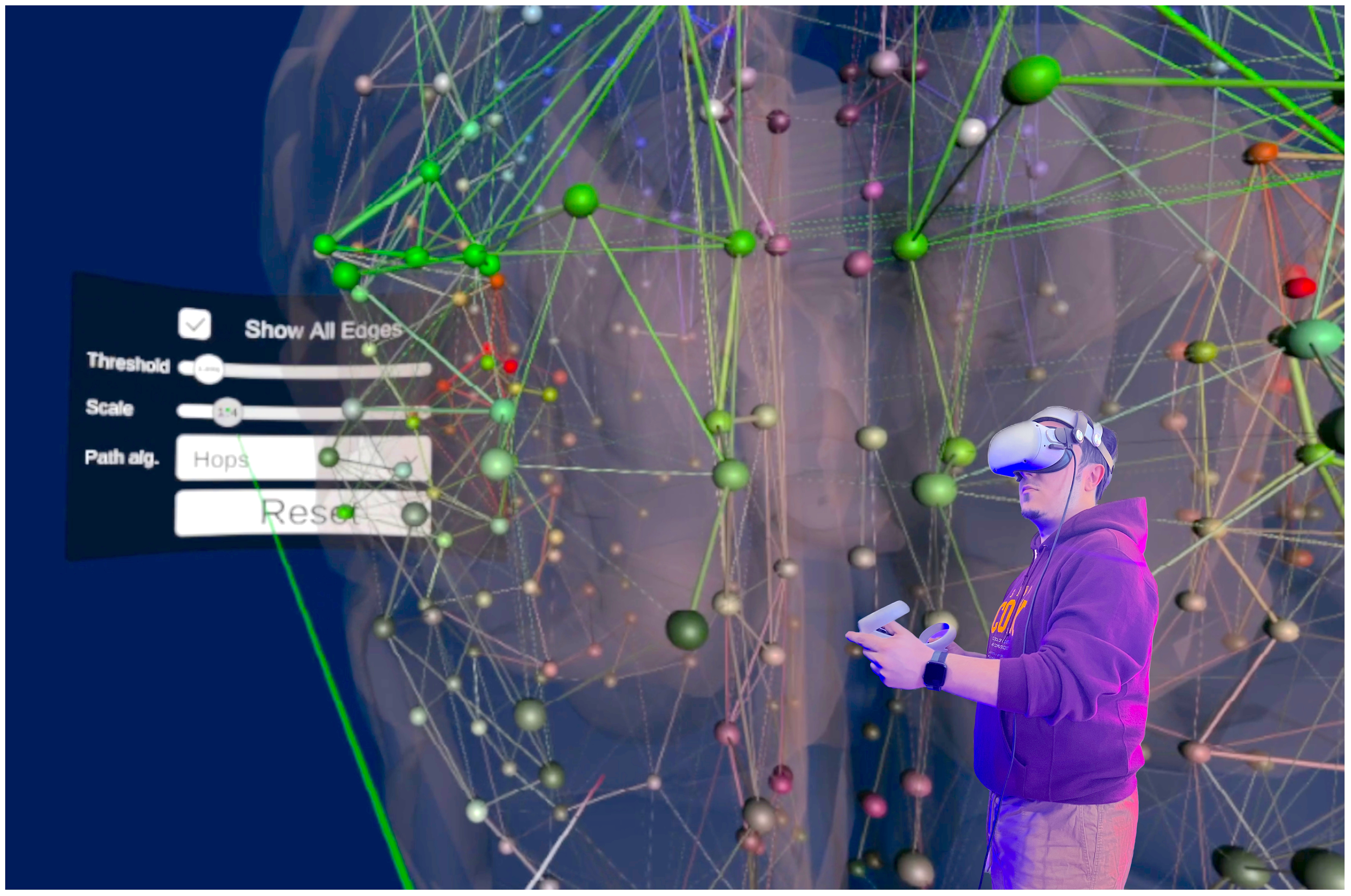
Virtual reality technology has proven to be a versatile tool for learning, exploration, and analysis. It can expand the user's senses, provide a more detailed and immersive view of the subject matter, encourage active learning and exploration, and facilitate global analysis of complex data. We present VRNConnect, a virtual reality system for interactively exploring brain connectivity data. VRNConnect enables users to analyze brain networks using either structural or functional connectivity matrices. By visualizing the 3D brain connectome network as a graph, users can interact with various regions using hand gestures or controllers to access network analysis metrics and information about Regions of Interest (ROIs). The system includes features such as colour coding of nodes and edges, thresholding, and shortest path calculation to enhance usability. Moreover, VRNConnect has the ability to be tailored to specific needs, allowing for the importation of connectivity data from various modalities. Our platform was designed with flexibility in mind, making it easy to incorporate additional features as needed.
- Meta Quest 2 VR headset
- Unity Game Engine 2021.3.4f1 or later
- Oculus Integration SDK v38
- Meta Quest link application for windows
- IDE for Python v3 and C#
The developed application, VR-Connect, allows users to input connectivity data and a brain parcellation file to visualize the results in virtual reality (VR). The application utilizes C# scripts and the Unity 3D game engine to create a brain connectivity network graph using a structural connectivity matrix. For graph analysis and network measurements, the Brain Connectivity Toolbox Python extension is employed. Interactions with the Oculus headset are facilitated through the Oculus integration SDK.
To generate the connectivity data for input into VR-Connect, the authors followed the B.A.T.M.A.N tutorial, which involves tractography analysis and visualization using MR-trix3 and other optional packages. The process includes preprocessing steps such as denoising, unringing, motion and distortion correction. The fibre orientation distribution is estimated to determine the orientation of the fibres voxel by voxel. A whole brain tractogram is then created, and the results are normalized. Finally, the connectome construction step involves mapping the tractography data onto a brain atlas and identifying the connections between regions.
The outcome of the B.A.T.M.A.N tutorial using the provided sample data is a 2D structural matrix with dimensions 379x379. It includes 180 parcellation areas on each cortical hemisphere based on the HCPMMP atlas version 1.0, as well as 19 subcortical regions.
The application development utilized Unity 2021.4 game engine and the Oculus Integration SDK (v38) to ensure seamless integration and access to the latest features of the Meta Oculus Quest 2 headset. C# scripting was used to communicate with the Unity engine, while Python v3 served as a bridge between the C# scripts and the Brain Connectivity Toolbox Python library (bctpy). The HCP-MMP1 atlas, which contains information about the regions and their colour coding, was incorporated as development assets.
In the application, connectivity data is loaded dynamically at runtime using a C# script in Unity. This script reads the corresponding CSV files and instantiates the objects (nodes/edges), calculates their center of mass, and assigns atlas region information and colours to each node, effectively generating the connectome graph. This feature allows users to load their own data, explore it, interact with it, and run analyses on it. To load their own data, users need to provide the following inputs:
- A CSV file containing the 2D connectivity matrix, either structural or functional.
- A CSV file containing the regions of the atlas and information about each region. It is crucial for this atlas parcellation to match the one used to create the connectivity matrix to ensure proper mapping of nodes/regions.
- A CSV file containing the colour-coding of regions in the brain atlas (optional). If not provided, all nodes will have the same grey colour.

The application implements both controller-based and hand gesture-based interactions to enhance user convenience and versatility. These features were integrated using the Oculus integration SDK (v38). Although hand gesture detection is still in the early stages of development, the pinch gesture and controller trigger button were successfully implemented for node selection. The virtual visualization of the controller mesh object allows users to see the controls and buttons within the VR environment.
Users can move around and rotate the brain connectivity object using the controller's Axis2D thumbstick buttons, providing a typical VR navigation experience. While object rotation via hand gestures is not currently supported, users can freely walk around and even enter the virtual brain. Additional controller interactions include rotating the brain using the buttons on the right/left controllers to adjust the viewing angle. The provided figure illustrates a sample of the Oculus controllers and their key bindings.
When a user points to a node with the laser (emitted from either the hand or controllers), the node is highlighted, and the user is presented with information about the region name and the corresponding name acquired from the parcellation. Selecting a node through a button press or pinch gesture triggers the display of an extended version of the node's data on a panel attached to the user's left hand.
Another feature of the application is the ability to show the shortest path between two selected nodes. This is achieved through a Python script developed to handle intermediate data creation, process the algorithm, and publish the results back to Unity. Two different algorithms can be used to calculate the shortest path, which can be changed within the VR interface. One algorithm considers the weight of the edges using Floyd-Warshall's algorithm, while the other algorithm focuses on the least number of hops.

