This service implements the integration of Suno AI and can be used to generate music, lyrics, and other content.
API home page: Ace Data Cloud - Suno Music Generation
With the widespread application of AI, various AI programs have gradually become popular. AI has gradually penetrated all aspects of people's work and life. The industries involved in AI are also increasing, from the initial writing, to medical education, and now to music.
Suno is a professional high-quality AI song and music creation platform. Users only need to input simple text prompts to generate songs with vocals based on genre style and lyrics. This AI music generator is developed by team members from well-known tech companies such as Meta, TikTok, and Kensho, aiming to allow everyone to create wonderful music without any musical instruments.
Here is the progress of model updates:
| Version | model | Launch Date | prompt Limit | style Limit | Maximum Song Duration |
|---|---|---|---|---|---|
| v5 | chirp-v5 | 2025.09.23 | 5000 | 1000 | 8 minutes |
| v4.5+ | chirp-v4-5-plus | 2025.07.17 | 5000 | 1000 | 8 minutes |
| v4.5 | chirp-v4-5 | 2025.05.03 | 5000 | 1000 | 4 minutes |
| v4 | chirp-v4 | 2024.12.17 | 3000 | 200 | 150 seconds |
| v3.5 | chirp-v3-5 | --- | 3000 | 200 | 120 seconds |
Suno has recently upgraded its music generation model to version V5. To call the latest V5, simply change the model parameter to chirp-v5, which can generate songs up to 9 minutes long.
However, Suno does not officially provide an API. AceDataCloud offers a set of Suno APIs that simulate the official Suno interface, making it easy and quick to generate the desired music.
To use the Suno Audios API, you can first visit the Suno Audios Generation API page and click the "Acquire" button to obtain the credentials needed for requests:

If you are not logged in or registered, you will be automatically redirected to the login page inviting you to register and log in. After logging in or registering, you will be automatically returned to the current page.
Upon first application, there will be a free quota available for use of the API.
To generate songs, you can input any text. For example, if I want to generate a song about Christmas, I can input a song for Christmas, as shown in the image:
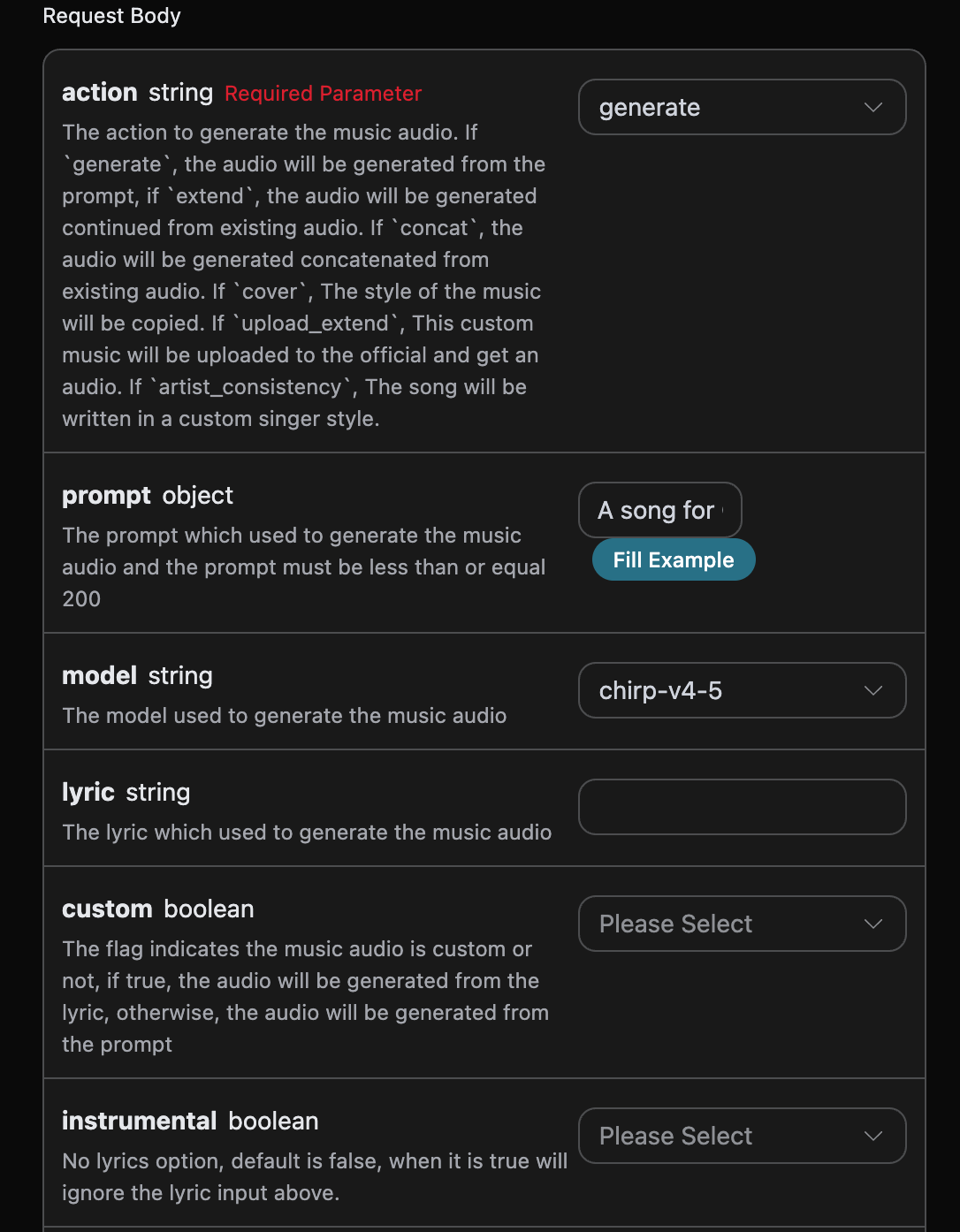
Here we can see that we have set the Request Headers, including:
accept: the format of the response result you want to receive, filled in asapplication/json, which means JSON format.authorization: the key to call the API, which can be directly selected after application.
Additionally, we set the Request Body, including:
action: the action of this music generation task, default isgenerate, mainly includes:extend,upload_extend,cover,upload_cover,replace_section,concat,stems,all_stems,remaster.prompt: the prompt for the inspiration mode from Suno.model: the model for this music generation task, default ischirp-v3-5, mainly includes:chirp-v3,chirp-v4,chirp-v3-5,chirp-v4-5,chirp-v4-5-plus,chirp-v5.lyric: the lyrics content for the custom mode from Suno.custom: whether to use the custom mode, default is:false.instrumental: the pure music option for the inspiration mode from Suno.title: the music title for the custom mode from Suno.style: the music style for the custom mode from Suno.style_negative: the excluded style for the custom mode from Suno.audio_weight: the proportion of the uploaded reference audio, range 0-1, the larger the more it relies on the reference audio.audio_id: the ID of the reference music.overpainting_start/overpainting_end: the start and end time in seconds for adding vocals to existing pure music.underpainting_start/underpainting_end: the start and end time in seconds for adding accompaniment to a cappella.persona_id: the artist's song ID.continue_at: the time in seconds to continue the existing audio. For example, 213.5 means continue to 3 minutes and 33.5 seconds.style_influence: advanced parameter forstyle_influence.replace_section_end: the final time for the replacement segment.replace_section_start: the starting time for the replacement segment.vocal_gender: controls the gender of the voice, femalef, malem, effective for models 4.5 and above.weirdness: advanced parameter forweirdness.lyric_prompt: the prompt for generating lyrics, effective only whencustomistrueandlyricis not provided.callback_url: the URL for callback results.
The generated code is as follows:
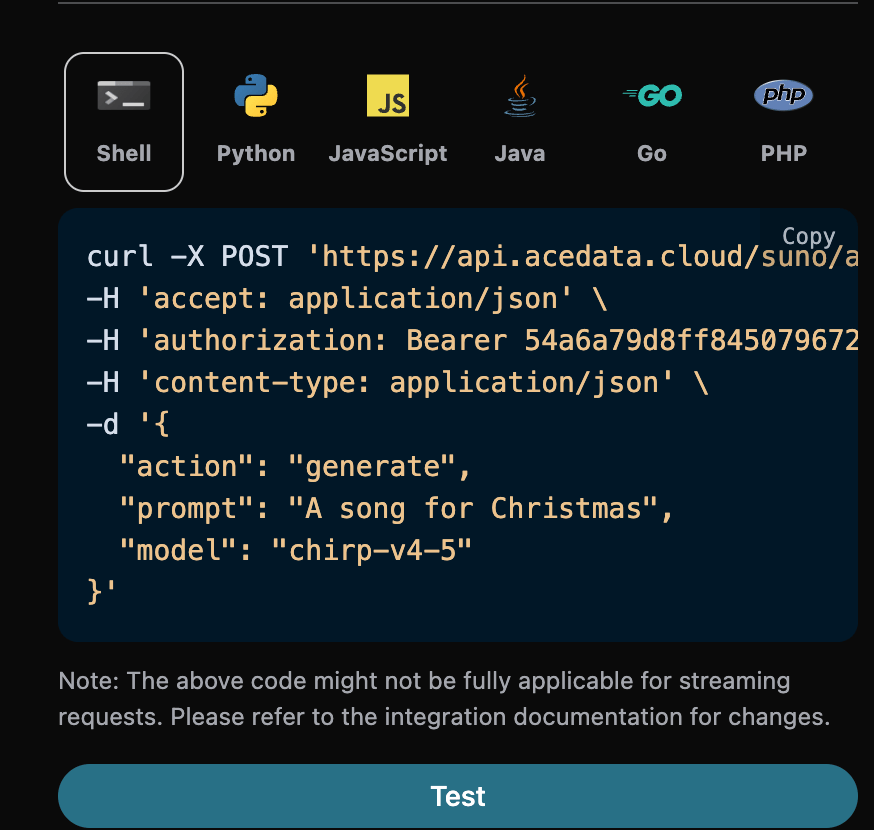
You can click the "Try" button to directly test the API, and after waiting for 1-2 minutes, the result is as follows:
{
  "success": true,
  "task_id": "e72fb249-bd5b-4e2a-b20c-8a06fea5ac14",
  "trace_id": "7dbc5b6a-b2c0-4d85-9d39-fa8a8a785ccf",
  "data": [
    {
      "id": "b481b17a-bf50-4e10-8adc-4d5635050893",
      "title": "Under the Mistletoe",
      "image_url": "https://cdn2.suno.ai/image_b481b17a-bf50-4e10-8adc-4d5635050893.jpeg",
      "lyric": "[Verse]\nSnowflakes falling on the ground\nTwinkling lights all around\nThe scent of pine fills the air\nChristmas magic everywhere\n[Chorus]\nUnder the mistletoe tonight\nHearts aglow in the soft moonlight\nLaughter echoes\nSpirits bright\nIt’s Christmas time\nIt feels so right\n[Verse 2]\nStockings hung by the fire’s glow\nWarmth inside while the cold winds blow\nCookies baking\nSweet delight\nA season of joy shining bright\n[Chorus]\nUnder the mistletoe tonight\nHearts aglow in the soft moonlight\nLaughter echoes\nSpirits bright\nIt’s Christmas time\nIt feels so right\n[Bridge]\nCarols sung by candlelight\nStars above make the world feel tight\nPeace and love\nA season’s creed\nFilling hearts with all we need\n[Chorus]\nUnder the mistletoe tonight\nHearts aglow in the soft moonlight\nLaughter echoes\nSpirits bright\nIt’s Christmas time\nIt feels so right",
      "audio_url": "https://cdn1.suno.ai/b481b17a-bf50-4e10-8adc-4d5635050893.mp3",
      "video_url": "",
      "created_at": "2025-06-17T15:59:32.468Z",
      "model": "chirp-auk",
      "state": "succeeded",
      "prompt": "A song for Christmas",
      "style": "holiday, cheerful, male vocals",
      "duration": 154.92
    },
    {
      "id": "fbf22dab-5e2b-4e02-84c0-6d7605f14c3d",
      "title": "Under the Mistletoe",
      "image_url": "https://cdn2.suno.ai/image_fbf22dab-5e2b-4e02-84c0-6d7605f14c3d.jpeg",
      "lyric": "[Verse]\nSnowflakes falling on the ground\nTwinkling lights all around\nThe scent of pine fills the air\nChristmas magic everywhere\n[Chorus]\nUnder the mistletoe tonight\nHearts aglow in the soft moonlight\nLaughter echoes\nSpirits bright\nIt’s Christmas time\nIt feels so right\n[Verse 2]\nStockings hung by the fire’s glow\nWarmth inside while the cold winds blow\nCookies baking\nSweet delight\nA season of joy shining bright\n[Chorus]\nUnder the mistletoe tonight\nHearts aglow in the soft moonlight\nLaughter echoes\nSpirits bright\nIt’s Christmas time\nIt feels so right\n[Bridge]\nCarols sung by candlelight\nStars above make the world feel tight\nPeace and love\nA season’s creed\nFilling hearts with all we need\n[Chorus]\nUnder the mistletoe tonight\nHearts aglow in the soft moonlight\nLaughter echoes\nSpirits bright\nIt’s Christmas time\nIt feels so right",
      "audio_url": "https://cdn1.suno.ai/fbf22dab-5e2b-4e02-84c0-6d7605f14c3d.mp3",
      "video_url": "",
      "created_at": "2025-06-17T15:59:32.468Z",
      "model": "chirp-auk",
      "state": "succeeded",
      "prompt": "A song for Christmas",
      "style": "holiday, cheerful, male vocals",
      "duration": 158.48
    }
  ]
}
You can see that we have obtained the content of two songs, including the title, preview image, lyrics, audio, video, and other content.
The field descriptions are as follows:
- success: Indicates whether the generation was successful; if successful, it is
true, otherwise it isfalse. - data: A list that contains detailed information about the generated songs.
- state: The song generation status, mainly includes four types, as follows:
- succeeded: Generation successful
- pending: In queue
- running: In progress
- error: Failed
- id: Song ID
- title: Title of the song
- image_url: Cover image of the song
- lyric: Lyrics of the song
- audio_url: Audio file of the song, opening it will play an mp3 audio.
- video_url: Video file of the song, opening it will play an mp4 video.
- created_at: Creation time
- model: The model used, generally the latest v3 model
- style: Style
- state: The song generation status, mainly includes four types, as follows:
If you want to customize the generation of lyrics, you can input the lyrics:
At this time, the lyric field can accept content similar to the following:
[Verse]\nSnowflakes falling all around\nGlistening white\nCovering the ground\nChildren laughing\nFull of delight\nIn this winter wonderland tonight\nSanta's sleigh\nUp in the sky\nRudolph's nose shining bright\nOh my\nHear the jingle bells\nRinging so clear\nBringing joy and holiday cheer\n[Verse 2]\nRoasting chestnuts by the fire's glow\nChristmas lights\nThey twinkle and show\nFamilies gathering with love and cheer\nSpreading warmth to everyone near
Note that the
\nin the lyrics is a newline character. If you do not know how to generate lyrics, you can use the lyrics generation API provided by AceDataCloud to generate lyrics through a prompt. The API is Suno Lyrics Generation API.
Next, we need to customize the generation of songs based on the lyrics, title, and style, and we can specify the following content:
- lyric: Lyrics text
- custom: Fill in as
true, indicating custom generation; this parameter defaults to false, indicating the use of prompt generation. - title: Title of the song.
- style: Style of the song, optional.
An example of filling in is as follows:
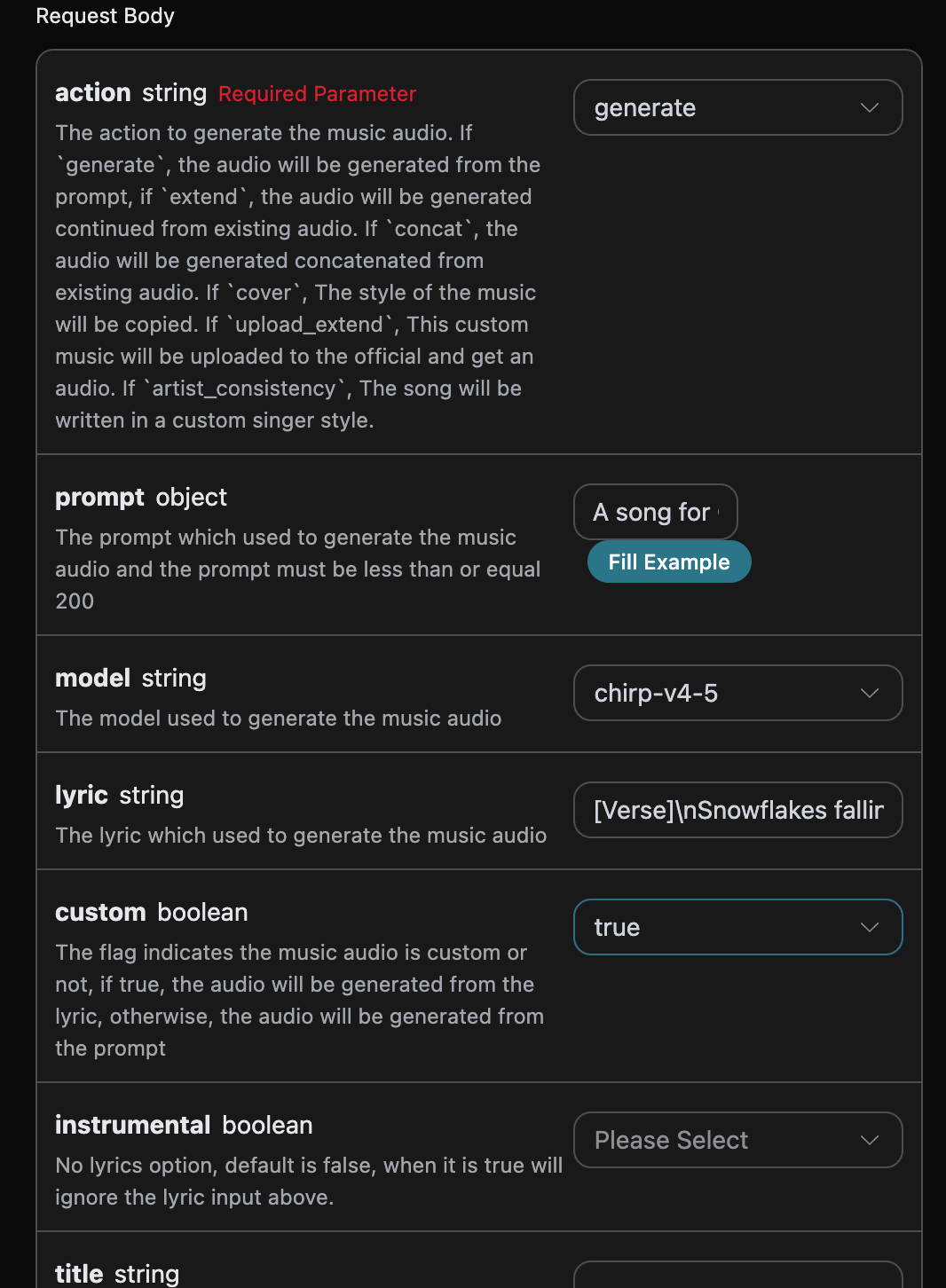
After filling it out, the code is automatically generated as follows:
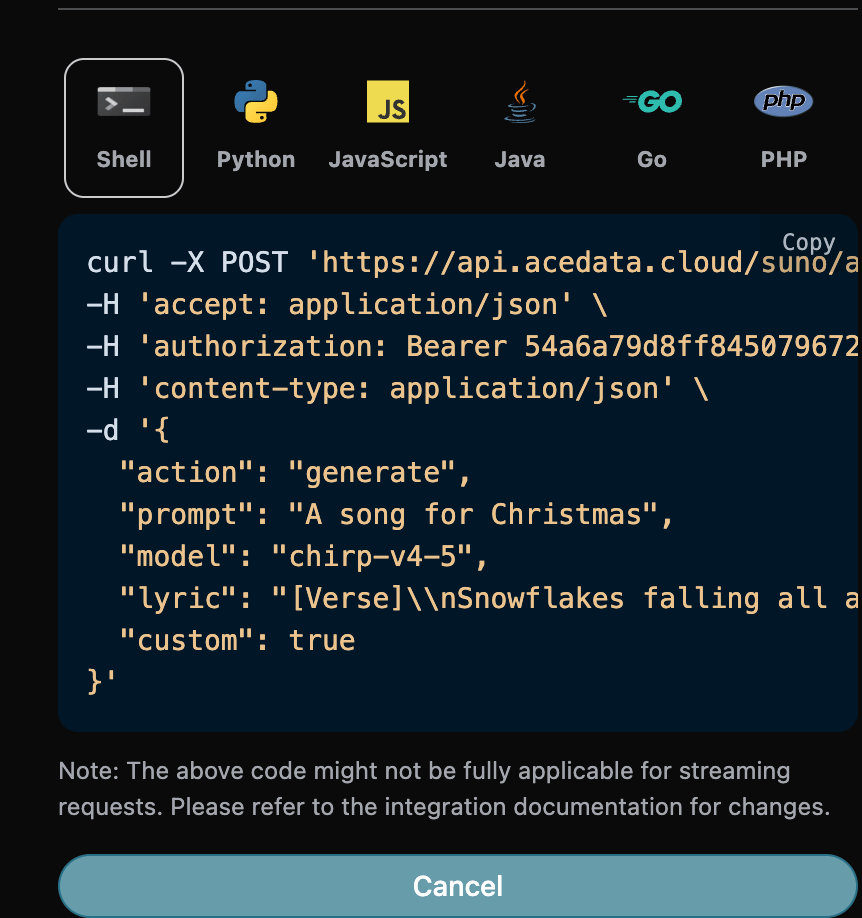
The corresponding code:
curl -X POST 'https://api.acedata.cloud/suno/audios' \
-H 'accept: application/json' \
-H 'authorization: Bearer {token}' \
-H 'content-type: application/json' \
-d '{
  "action": "generate",
  "prompt": "A song for Christmas",
  "model": "chirp-v4-5",
  "lyric": "[Verse]\\nSnowflakes falling all around\\nGlistening white\\nCovering the ground\\nChildren laughing\\nFull of delight\\nIn this winter wonderland tonight\\nSanta's sleigh\\nUp in the sky\\nRudolph's nose shining bright\\nOh my\\nHear the jingle bells\\nRinging so clear\\nBringing joy and holiday cheer\\n[Verse 2]\\nRoasting chestnuts by the fire's glow\\nChristmas lights\\nThey twinkle and show\\nFamilies gathering with love and cheer\\nSpreading warmth to everyone near",
  "custom": true
}'
Testing is allowed, and the generated effect is similar.
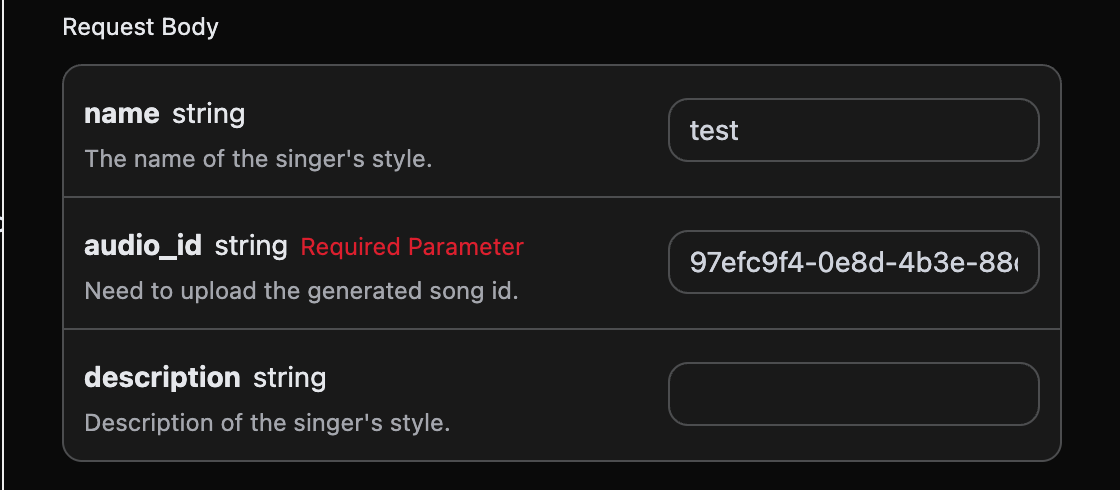
If you want to generate a song using a singer's style, first generate a song using the basic usage mentioned above. Finally, you need to set this song to the singer's style, and then enter the Suno Persona API to generate a singer style id parameter persona_id based on the official generated music ID audio_id. The specific parameters are shown in the image below:
After filling it out, the automatically generated code is as follows:
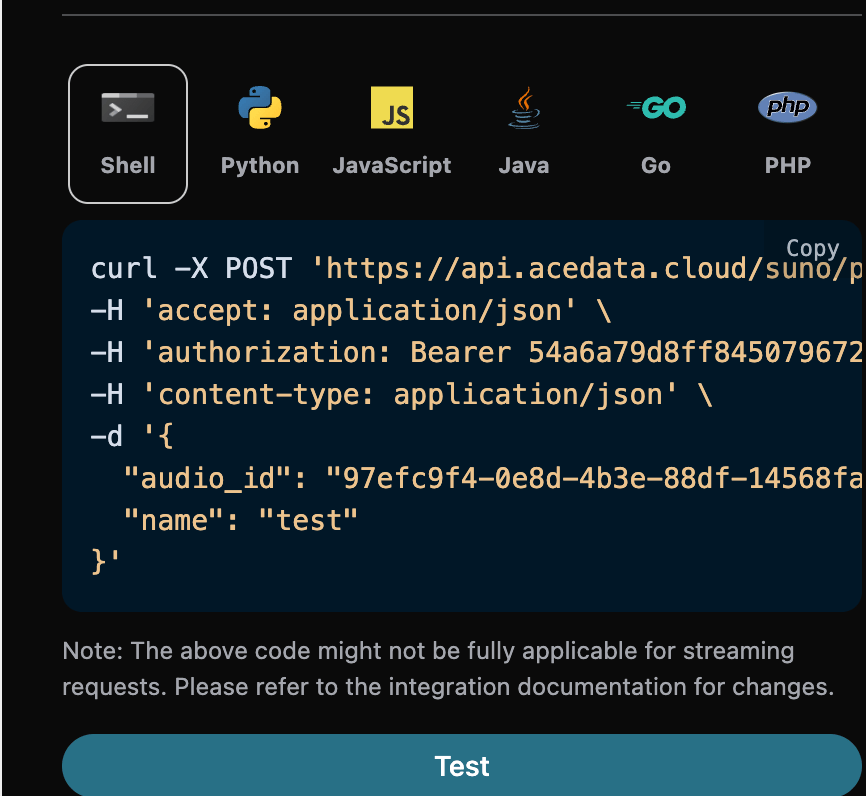
The corresponding Python code:
import requests

url = "https://api.acedata.cloud/suno/persona"

headers = {
    "accept": "application/json",
    "authorization": "Bearer {token}",
    "content-type": "application/json"
}

payload = {
    "audio_id": "97efc9f4-0e8d-4b3e-88df-14568fa1b11f",
    "name": "test"
}

response = requests.post(url, json=payload, headers=headers)
print(response.text)
Clicking run, you can find that a result will be obtained, as follows:
{
  "success": true,
  "task_id": "7628b754-4fe7-4e79-bda4-806d0dd8bf6e",
  "data": {
    "persona_id": "e0d7319e-aa2a-44cb-b00a-916218d7cb0b"
  }
}
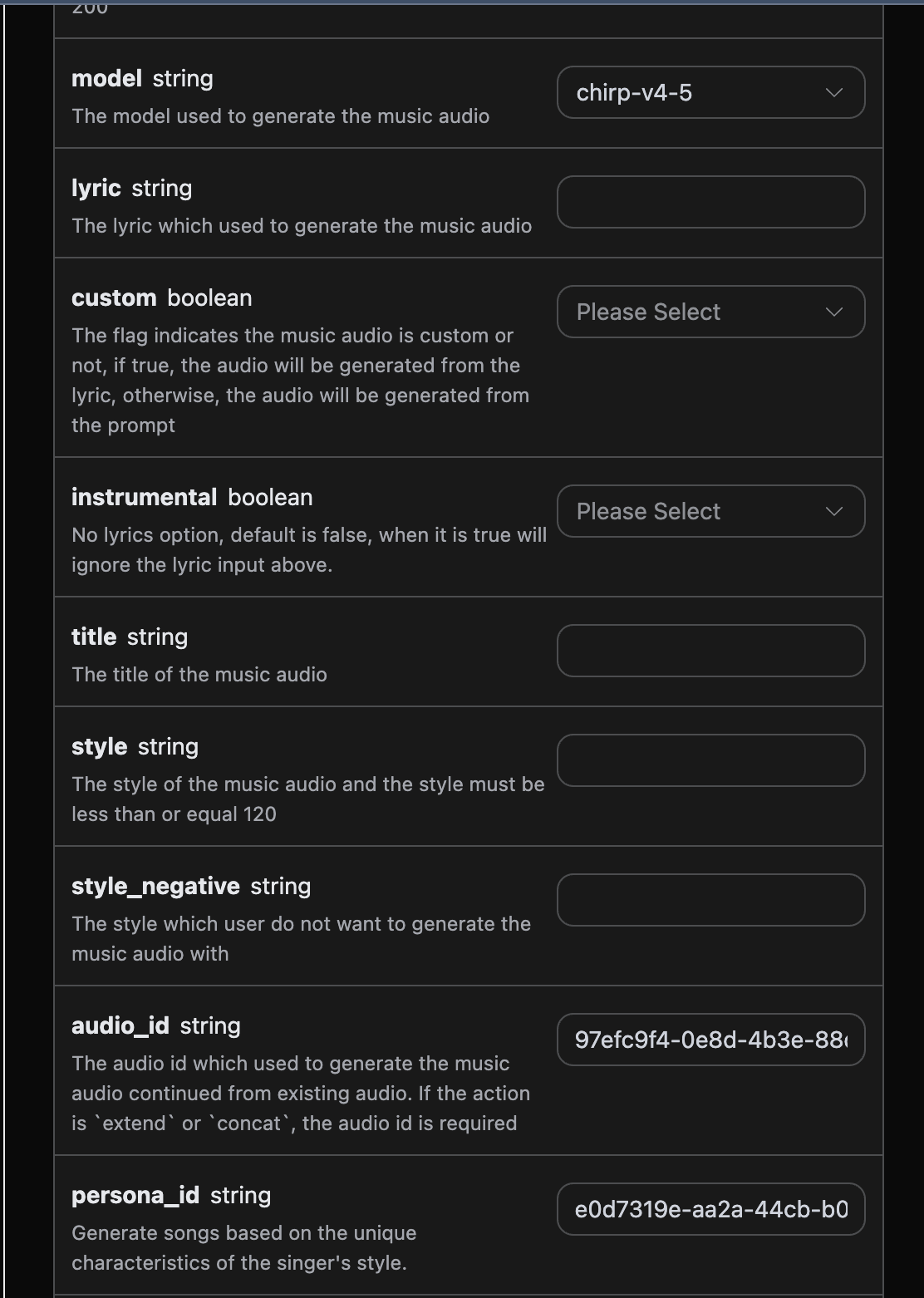
Using the above audio_id and persona_id as 97efc9f4-0e8d-4b3e-88df-14568fa1b11f and e0d7319e-aa2a-44cb-b00a-916218d7cb0b for this example data. Then you can set the parameter action to artist_consistency, and input the ID of the song you want to continue generating and the singer style ID, as shown in the example below:
After filling it out, the automatically generated code is as follows:
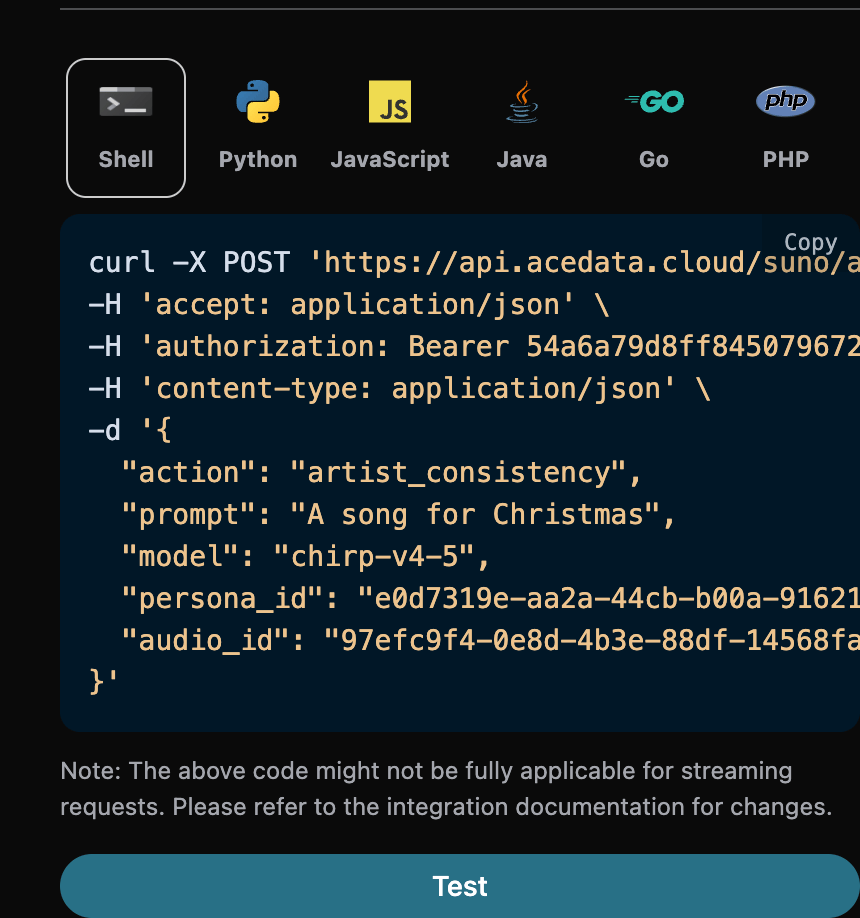
The corresponding Python code:
import requests

url = "https://api.acedata.cloud/suno/audios"

headers = {
    "accept": "application/json",
    "authorization": "Bearer {token}",
    "content-type": "application/json"
}

payload = {
    "action": "artist_consistency",
    "prompt": "A song for Christmas",
    "model": "chirp-v4-5",
    "persona_id": "e0d7319e-aa2a-44cb-b00a-916218d7cb0b",
    "audio_id": "97efc9f4-0e8d-4b3e-88df-14568fa1b11f"
}

response = requests.post(url, json=payload, headers=headers)
print(response.text)
Clicking run, you can find that a result will be obtained, as follows:
{
  "success": true,
  "task_id": "9b732b1a-bd67-48bc-95e4-90140e06836f",
  "trace_id": "30fcd88e-7687-4137-92d7-913b58115204",
  "data": [
    {
      "id": "727a36e2-8dce-4df7-99e5-14e44635c80f",
      "title": "",
      "image_url": "https://cdn2.suno.ai/image_727a36e2-8dce-4df7-99e5-14e44635c80f.jpeg",
      "lyric": "",
      "audio_url": "https://cdn1.suno.ai/727a36e2-8dce-4df7-99e5-14e44635c80f.mp3",
      "video_url": "",
      "created_at": "2025-06-17T16:27:33.979Z",
      "model": "chirp-auk",
      "state": "succeeded",
      "style": "",
      "duration": 244.4
    },
    {
      "id": "3b33301a-b17e-4b25-8842-09b46dab1a36",
      "title": "",
      "image_url": "https://cdn2.suno.ai/image_3b33301a-b17e-4b25-8842-09b46dab1a36.jpeg",
      "lyric": "",
      "audio_url": "https://cdn1.suno.ai/3b33301a-b17e-4b25-8842-09b46dab1a36.mp3",
      "video_url": "",
      "created_at": "2025-06-17T16:27:33.979Z",
      "model": "chirp-auk",
      "state": "succeeded",
      "style": "",
      "duration": 229.88
    }
  ]
}
It can be seen that the result content is consistent with the above text, thus achieving the function of generating songs using the singer's style.
If you want to continue generating an already generated Suno song, you can set the parameter action to extend, and input the ID of the song you want to continue generating. The song ID can be obtained based on the basic usage, and from the above text, you can see that the song ID is:
"id": "97efc9f4-0e8d-4b3e-88df-14568fa1b11f"
Note that the
idin the lyrics here is the ID of the generated song. If you do not know how to generate a song, you can refer to the basic usage above to generate a song.
If you want to continue generating a song that you uploaded, you can set the parameter action to upload_extend, and input the ID of the custom uploaded song you want to continue generating. The song ID can be obtained using the Suno Upload Generation API, as shown in the image below:
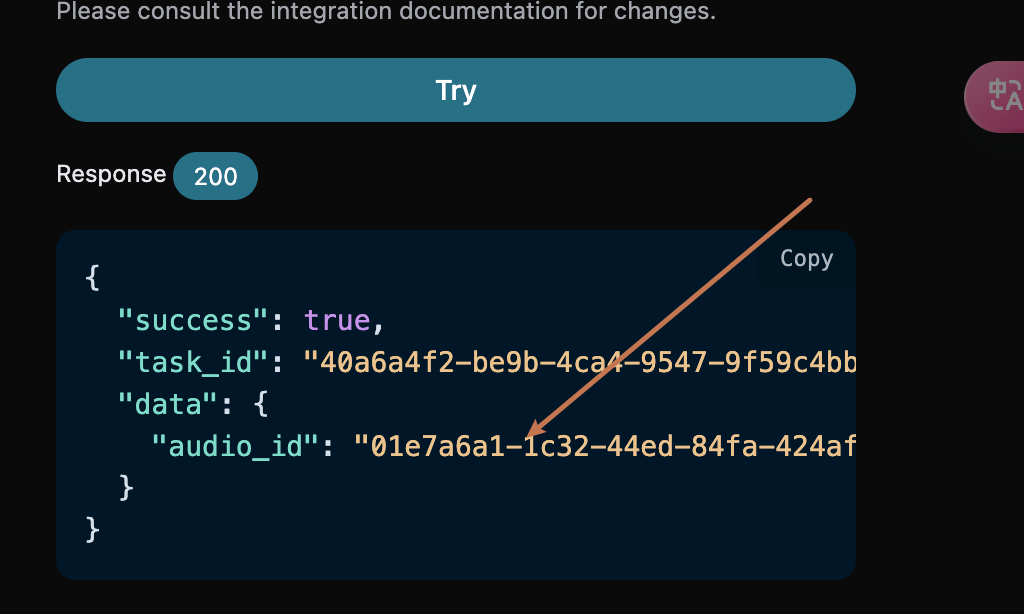
Next, we must fill in the lyrics and style to customize the generated song, specifying the following content:
- lyric: Lyrics text
- custom: Set to
true, representing custom generation. This parameter defaults to false, representing usingpromptfor generation. - style: The style of the song, optional.
- continue_at: The time in seconds to continue the existing audio. For example, 213.5 means to continue to 3 minutes and 33.5 seconds.
An example of filling it out is as follows:
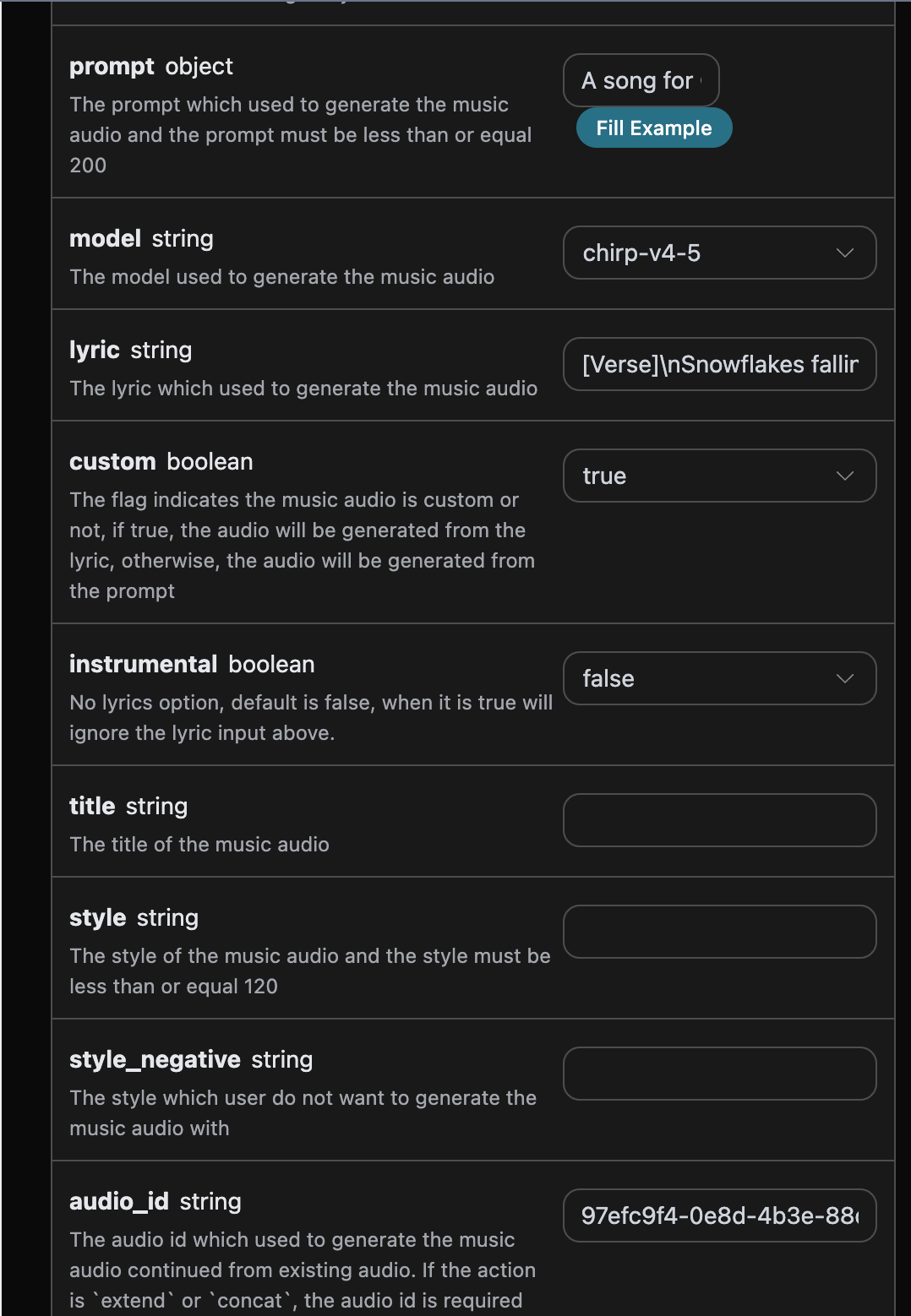
After filling it out, the automatically generated code is as follows:
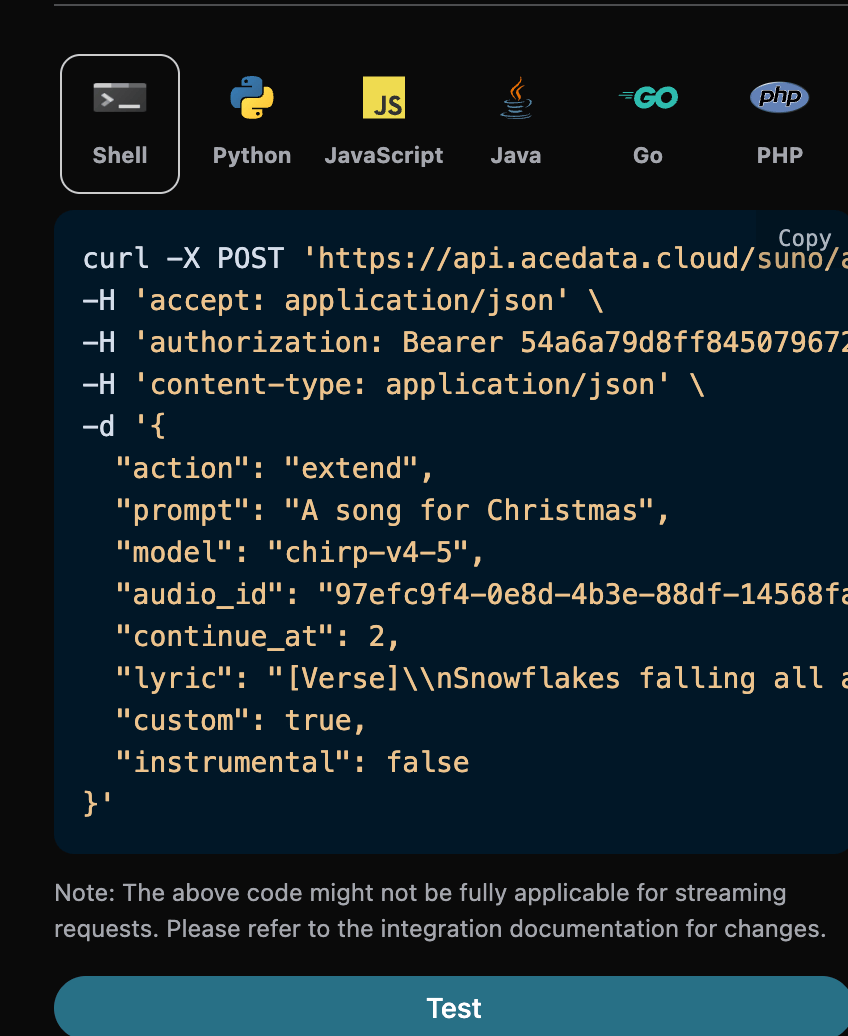
The corresponding Python code:
import requests

url = "https://api.acedata.cloud/suno/audios"

headers = {
    "accept": "application/json",
    "authorization": "Bearer {token}",
    "content-type": "application/json"
}

payload = {
    "action": "extend",
    "prompt": "A song for Christmas",
    "model": "chirp-v4-5",
    "audio_id": "97efc9f4-0e8d-4b3e-88df-14568fa1b11f",
    "continue_at": 2,
    "lyric": "[Verse]\\nSnowflakes falling all around\\nGlistening white\\nCovering the ground\\nChildren laughing\\nFull of delight\\nIn this winter wonderland tonight\\nSanta's sleigh\\nUp in the sky\\nRudolph's nose shining bright\\nOh my\\nHear the jingle bells\\nRinging so clear\\nBringing joy and holiday cheer\\n[Verse 2]\\nRoasting chestnuts by the fire's glow\\nChristmas lights\\nThey twinkle and show\\nFamilies gathering with love and cheer\\nSpreading warmth to everyone near",
    "custom": True,
    "instrumental": False
}

response = requests.post(url, json=payload, headers=headers)
print(response.text)
Click to run, and you will find a result as follows:
{
  "success": true,
  "task_id": "75b835d9-30d1-4641-8524-0aeedbdc9e1a",
  "trace_id": "44c41045-a2e1-4d19-aafc-7abd239d0d5c",
  "data": [
    {
      "id": "0a1e1b10-c36a-41c9-9bfb-b26d9d25db98",
      "title": "",
      "image_url": "https://cdn2.suno.ai/image_0a1e1b10-c36a-41c9-9bfb-b26d9d25db98.jpeg",
      "lyric": "[Verse]\\nSnowflakes falling all around\\nGlistening white\\nCovering the ground\\nChildren laughing\\nFull of delight\\nIn this winter wonderland tonight\\nSanta's sleigh\\nUp in the sky\\nRudolph's nose shining bright\\nOh my\\nHear the jingle bells\\nRinging so clear\\nBringing joy and holiday cheer\\n[Verse 2]\\nRoasting chestnuts by the fire's glow\\nChristmas lights\\nThey twinkle and show\\nFamilies gathering with love and cheer\\nSpreading warmth to everyone near",
      "audio_url": "https://cdn1.suno.ai/0a1e1b10-c36a-41c9-9bfb-b26d9d25db98.mp3",
      "video_url": "",
      "created_at": "2025-06-17T16:38:35.509Z",
      "model": "chirp-auk",
      "state": "succeeded",
      "style": "",
      "duration": 165.92
    },
    {
      "id": "4334c5b4-0a44-4b26-a8f6-66cc4dbb8fc3",
      "title": "",
      "image_url": "https://cdn2.suno.ai/image_4334c5b4-0a44-4b26-a8f6-66cc4dbb8fc3.jpeg",
      "lyric": "[Verse]\\nSnowflakes falling all around\\nGlistening white\\nCovering the ground\\nChildren laughing\\nFull of delight\\nIn this winter wonderland tonight\\nSanta's sleigh\\nUp in the sky\\nRudolph's nose shining bright\\nOh my\\nHear the jingle bells\\nRinging so clear\\nBringing joy and holiday cheer\\n[Verse 2]\\nRoasting chestnuts by the fire's glow\\nChristmas lights\\nThey twinkle and show\\nFamilies gathering with love and cheer\\nSpreading warmth to everyone near",
      "audio_url": "https://cdn1.suno.ai/4334c5b4-0a44-4b26-a8f6-66cc4dbb8fc3.mp3",
      "video_url": "",
      "created_at": "2025-06-17T16:38:35.509Z",
      "model": "chirp-auk",
      "state": "succeeded",
      "style": "",
      "duration": 158.84
    }
  ]
}
It can be seen that the result content is consistent with the above, thus achieving the function of continuing the song generation.
For more info, please check below APIs and integration documents.
| API | Path | Integration Guidance |
|---|---|---|
| Suno Audios Generation API | /suno/audios |
Suno Audios Generation API Integration Guide |
| Suno Persona API | /suno/persona |
Suno Persona API Integration Guide |
| Suno MP4 API | /suno/mp4 |
Suno MP4 API Integration Guide |
| $t(document_title_suno_wav_generation_api) | /suno/wav |
Suno Wav API Integration Guide |
| $t(document_title_suno_vox_generation_api) | /suno/vox |
$t(document_title_suno_vox_integration) |
| $t(document_title_suno_timing_generation_api) | /suno/timing |
Suno Timing API Integration Guide |
| Suno MIDI API | /suno/midi |
Suno MIDI API Integration Guide |
| Suno Style Generation API | /suno/style |
Suno Style API Integration Guide |
| Suno Lyrics Generation API | /suno/lyrics |
Suno Lyrics Generation API Integration Guide |
| Suno Tasks API | /suno/tasks |
Suno Tasks API Integration Guide |
| Suno Upload API | /suno/upload |
Suno Upload API Integration Guide |
Base URL: https://api.acedata.cloud
If you meet any issue, check our from support info.