###############################################################
- A headless Raspberry Pi 2 connected to the wifi network
- An AM2303 temperature and humidity sensor
- A 16x2 LCD display with LCM1602 I2C converter
- Jumper cables
I have OSMC installed on my memory card, so first I needed to install some software:
    sudo apt-get update
    sudo apt-get install -y gcc make build-essentials python3 screen
Next, I installed raspi-config as defined here.
Following that, I needed to install pigpio:
    wget abyz.co.uk/rpi/pigpio/pigpio.zip
    unzip pigpio.zip
    make
    sudo make install
To work properly, the pigpio daemon needs to be running to transfer data. Running pigpio (in a new screen window):
sudo pigpiodTo use the LCD display, I needed also to install smbus:
sudo -i
apt-get install python3-dev
apt-get install libi2c-dev
cd /tmp
wget http://ftp.de.debian.org/debian/pool/main/i/i2c-tools/i2c-tools_3.1.0.orig.tar.bz2 # download Python 2 source
tar xavf i2c-tools_3.1.0.orig.tar.bz2
cd i2c-tools-3.1.0/py-smbus
mv smbusmodule.c smbusmodule.c.orig # backup
wget https://gist.githubusercontent.com/sebastianludwig/c648a9e06c0dc2264fbd/raw/2b74f9e72bbdffe298ce02214be8ea1c20aa290f/smbusmodule.c # download patched (Python 3) source
python3 setup.py build
python3 setup.py install
exit
The next step was to enable i2c via raspi-config:
sudo raspi-config
Then:
- select advance menu
- select i2c
- enable it.
Use:
sudo i2cdetect -y 1to check if the i2c device is found. If not, follow the advice here.
The weather and humidity sensor AM2302 (DHT22) has 3 pins:
- VCC (+) - input (3V to 5.5V)
- GND (-) - ground
- OUT - data output
| DTH22 pin | RPI pin |
|---|---|
| VCC | 1 |
| GND | 6 |
| OUT | 7 |
The LCD display has 4 pins:
- VCC - input (5V)
- SDA - I2C data
- SCL - I2C clock
- GND - ground
| LCM1602 pin | RPI pin |
|---|---|
| VCC | 2 |
| SDA | 3 |
| SCL | 5 |
| GND | 25 |
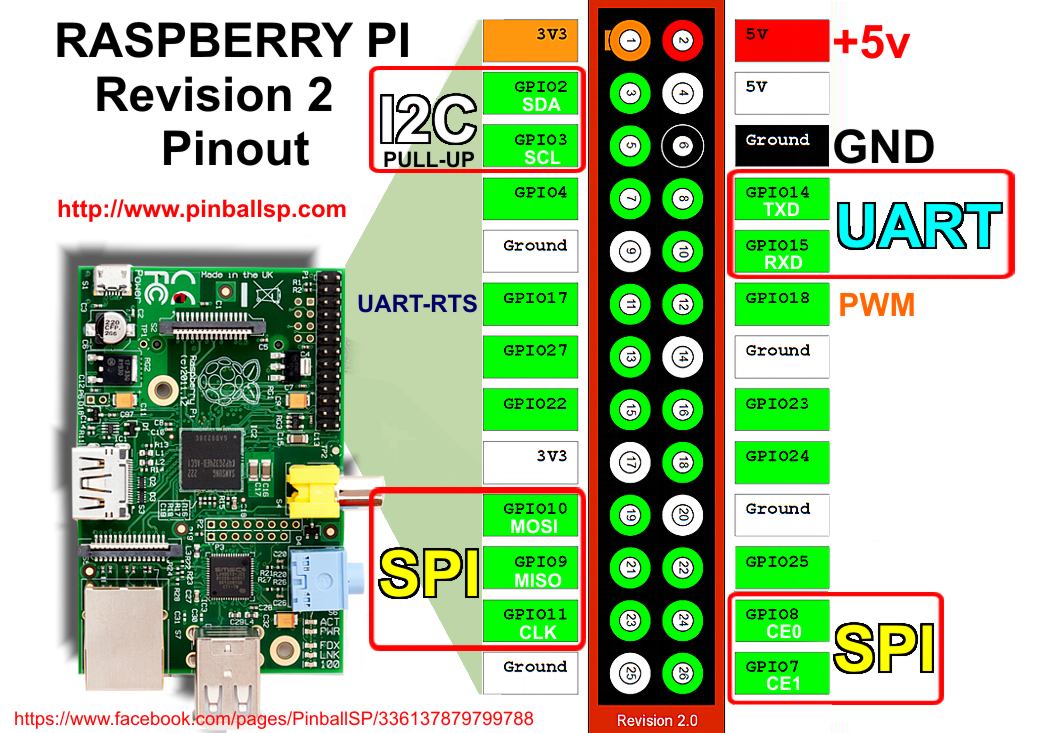
To perform a simple test if everything works as expected, let's open up python3 console and run:
    import pigpio
    import DHT22
    pi = pigpio.pi()
    probe = DHT22.sensor(pi, 4)
    probe.trigger()
    temp = probe.temperature()
    humid = probe.humidity
    print("Current temperature is {}C, while current humidity is
{}%".format(temp, humid))New data from the sensor can be obtained every 2 seconds. It is streamed to my sparkfun API account.
The data is visualized using the D3 library. The results can be viewed here: https://4gn3s.github.io/weatherStation/ There are separate graphs for temperature and humidity.
- wind & speed direction
- light cycles
- air quality
- barometric pressure
- rain
- How does the temperature in my room vary between day and night, weekdays and weekend?
- In which months there is the most rain? Which are the driest?
- How does air quality change depending on the season? Is it the worst in the winter?
- view radar images from the internet (served as gifs)
- show alerts (from wunderground)
- show weather forecast (from openweathermap)