https://github.com/josdejong/jsoneditor http://jsoneditoronline.org/
Website: http://jsoneditoronline.org/ Github: https://github.com/josdejong/jsoneditor
JSON编辑器是一个基于网络的工具来查看、编辑和格式JSON。 这模式如树有各种编辑器,代码编辑器和一个纯文本 。
编辑可以作为你自己的Web应用程序的一个组成部分。图书馆可以为 CommonJS模块,加载和模块,或作为一个JavaScript文件。
支持的浏览器:Chrome,Firefox,Safari,Opera,Internet Explorer 9.

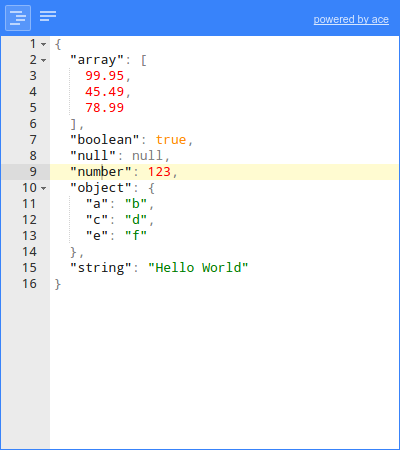
编辑、添加、移动、删除、复制字段和值。 改变的值的类型。 排序数组和对象。 彩色编码。 搜索和突出树视图中的文本。 撤消和重做所有的行动。
格式和紧凑的JSON。 彩色编码(由ACE)。 检查JSON(由ACE)。
- 格式和紧凑的JSON。
with npm:
npm install jsoneditor
with bower:
bower install jsoneditor
download:
http://jsoneditoronline.org/downloads/
There is a directive available for using JSONEditor in Angular.js:
https://github.com/angular-tools/ng-jsoneditor
<!DOCTYPE HTML>
<html>
<head>
    <!-- when using the mode "code", it's important to specify charset utf-8 -->
    <meta http-equiv="Content-Type" content="text/html;charset=utf-8">

    <link href="jsoneditor/dist/jsoneditor.min.css" rel="stylesheet" type="text/css">
    <script src="jsoneditor/dist/jsoneditor.min.js"></script>
</head>
<body>
    <div id="jsoneditor" style="width: 400px; height: 400px;"></div>

    <script>
        // create the editor
        var container = document.getElementById("jsoneditor");
        var editor = new JSONEditor(container);

        // set json
        var json = {
            "Array": [1, 2, 3],
            "Boolean": true,
            "Null": null,
            "Number": 123,
            "Object": {"a": "b", "c": "d"},
            "String": "Hello World"
        };
        editor.set(json);

        // get json
        var json = editor.get();
    </script>
</body>
</html>The code of the JSON Editor is located in the folder ./src. To build
jsoneditor:
-
Install dependencies:
npm install -
Build JSON Editor:
npm run buildThis will generate the files
./jsoneditor.js,./jsoneditor.css, and
minified versions in the root of the project.
The source code of JSONEditor consists of CommonJS modules. JSONEditor can be bundled in a customized way using a module bundler like browserify or webpack. First, install all dependencies of jsoneditor:
npm install
To create a custom bundle of the source code using browserify:
browserify ./index.js -o ./jsoneditor.custom.js -s JSONEditor
The Ace editor, used in mode code, accounts for about 75% of the total
size of the library. To exclude the Ace editor from the bundle:
browserify ./index.js -o ./jsoneditor.custom.js -s JSONEditor -x brace -x brace/mode/json -x brace/ext/searchbox
To minify the generated bundle, use uglifyjs:
uglifyjs ./jsoneditor.custom.js -o ./jsoneditor.custom.min.js -m -c