[BUG] Search term disappears when creating New Workspace #481


Description

Bug Description
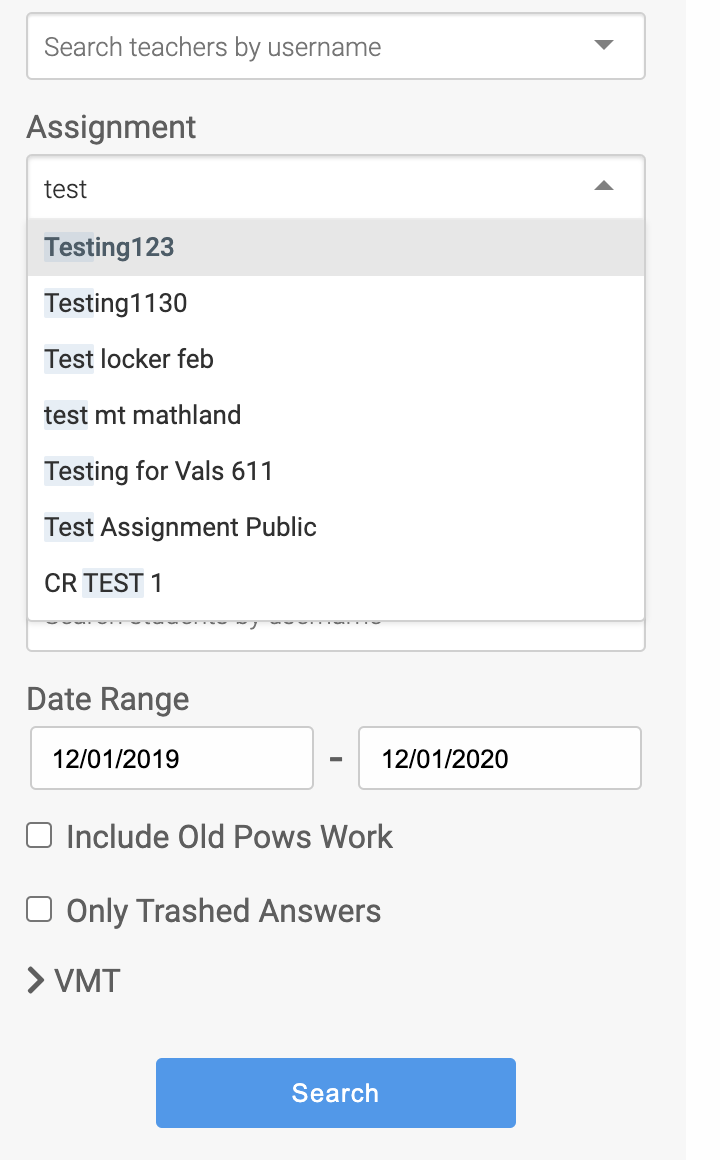
When creating a new workspace, using the navigation bar on the left. If you type into the fields for Assignment or Class, the search term that you type may not appear when another filter field is present. The expected behavior is that these search terms should persist to be able to find the desired student response.
For example, Filling in a teacher should show all options under that teacher. The example of this bug is a new workspace where Shumaw was added as a teacher and then we could not find the response using his name as the teacher's name of the workspace.
To Reproduce
Steps to reproduce the behavior:
- Go to encompass and hover on the top yellow button labeled [workspaces]
- Click on 'new' in the dropdown that appears
- In the left nav bar search for Assignment term or Class term by typing a term into those field boxes. (See screenshot for example)
- See error, the search term in these fields will disappear
Expected behavior
The expected behavior is that these search terms should persist. For example with the other fields if you type in a search term the suggested terms
Screenshots
Additional context (Environment)
Might need a refresher once this issue is in progress. (Difficult to reproduce bug)