Files missing in Solution Explorer not showing in output after build #142

Description

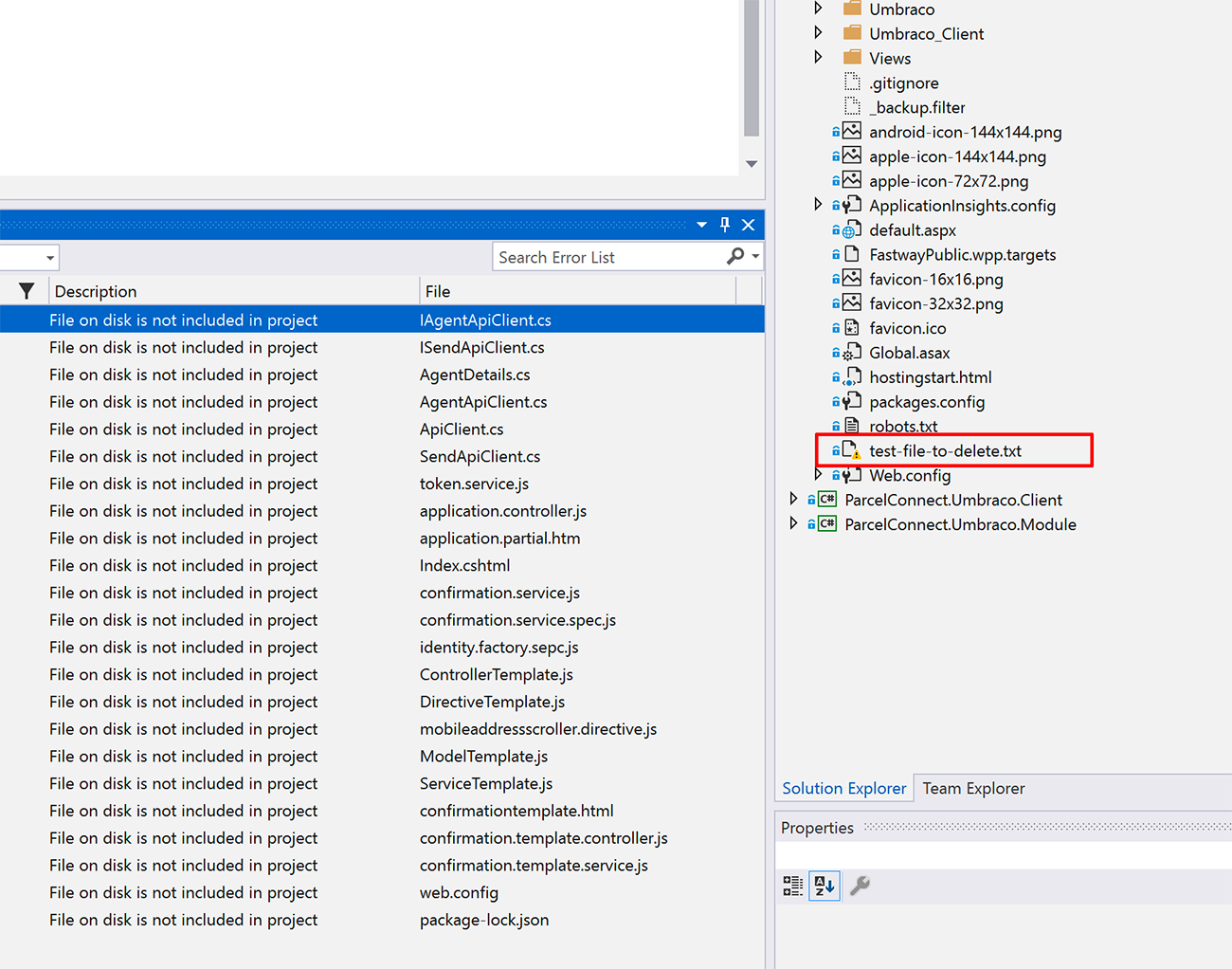
After installing the extension, restarting VS and clean/building solution I am able to see the files that are on disk but are not included in solution in the error output - but as you can see from the screen shot missing files are not appearing in the output.
VISUAL STUDIO INSTALLATION DETAILS
Microsoft Visual Studio Professional 2019
Version 16.1.4
VisualStudio.16.Release/16.1.4+29020.237
Microsoft .NET Framework
Version 4.8.03761
Installed Version: Professional
Application Insights Tools for Visual Studio Package 9.1.00429.1
Application Insights Tools for Visual Studio
ASP.NET and Web Tools 2019 16.1.429.50124
ASP.NET and Web Tools 2019
ASP.NET Web Frameworks and Tools 2012 16.1.429.50124
For additional information, visit https://www.asp.net/
ASP.NET Web Frameworks and Tools 2019 16.1.429.50124
For additional information, visit https://www.asp.net/
Azure App Service Tools v3.0.0 16.1.429.50124
Azure App Service Tools v3.0.0
Azure Functions and Web Jobs Tools 16.1.429.50124
Azure Functions and Web Jobs Tools
C# Tools 3.1.1-beta4-19281-06+58a4b1e79aea28115e66b06f850c83a3f1fcb6d3
C# components used in the IDE. Depending on your project type and settings, a different version of the compiler may be used.
Common Azure Tools 1.10
Provides common services for use by Azure Mobile Services and Microsoft Azure Tools.
Entity Framework Core Power Tools 1.0
Adds useful design-time EF Core DbContext features to the Visual Studio Solution Explorer context menu.
IntelliCode Extension 1.0
IntelliCode Visual Studio Extension Detailed Info
Microsoft Azure Tools 2.9
Microsoft Azure Tools for Microsoft Visual Studio 0x10 - v2.9.20419.2
Microsoft Continuous Delivery Tools for Visual Studio 0.4
Simplifying the configuration of Azure DevOps pipelines from within the Visual Studio IDE.
Microsoft JVM Debugger 1.0
Provides support for connecting the Visual Studio debugger to JDWP compatible Java Virtual Machines
Microsoft Library Manager 1.0
Install client-side libraries easily to any web project
Microsoft MI-Based Debugger 1.0
Provides support for connecting Visual Studio to MI compatible debuggers
Microsoft Visual Studio Tools for Containers 1.1
Develop, run, validate your ASP.NET Core applications in the target environment. F5 your application directly into a container with debugging, or CTRL + F5 to edit & refresh your app without having to rebuild the container.
NuGet Package Manager 5.1.0
NuGet Package Manager in Visual Studio. For more information about NuGet, visit https://docs.nuget.org/
ProjectServicesPackage Extension 1.0
ProjectServicesPackage Visual Studio Extension Detailed Info
ResourcePackage Extension 1.0
ResourcePackage Visual Studio Extension Detailed Info
ResourcePackage Extension 1.0
ResourcePackage Visual Studio Extension Detailed Info
SQL Server Data Tools 16.0.61904.23160
Microsoft SQL Server Data Tools
TypeScript Tools 16.0.10506.2004
TypeScript Tools for Microsoft Visual Studio
Visual Basic Tools 3.1.1-beta4-19281-06+58a4b1e79aea28115e66b06f850c83a3f1fcb6d3
Visual Basic components used in the IDE. Depending on your project type and settings, a different version of the compiler may be used.
Visual F# Tools 10.4 for F# 4.6 16.1.0-beta.19253.3+42526fe359672a05fd562dc16a91a43d0fe047a7
Microsoft Visual F# Tools 10.4 for F# 4.6
Visual Studio Code Debug Adapter Host Package 1.0
Interop layer for hosting Visual Studio Code debug adapters in Visual Studio
Visual Studio Tools for Containers 1.0
Visual Studio Tools for Containers
Web Compiler 1.12.394
Compiler for LESS, Sass and CoffeeScript files