add preset: chrome #30

Description

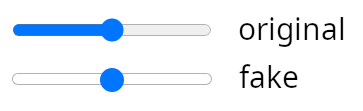
lets add this preset to make sliders look like in chrome browser
Details
input[type=range] {
  width: 100%;
  margin: 4px 0;
  background-color: transparent;
  -webkit-appearance: none;
}
input[type=range]:focus {
  outline: none;
}
input[type=range]::-webkit-slider-runnable-track {
  background: rgba(255, 255, 255, 0.78);
  border: 0.2px solid rgba(1, 1, 1, 0.3);
  border-radius: 5px;
  width: 100%;
  height: 8px;
  cursor: pointer;
}
input[type=range]::-webkit-slider-thumb {
  margin-top: -4.2px;
  width: 16px;
  height: 16px;
  background: #0075ff;
  border: 0;
  border-radius: 9px;
  cursor: pointer;
  -webkit-appearance: none;
}
input[type=range]:focus::-webkit-slider-runnable-track {
  background: #ffffff;
}
input[type=range]::-moz-range-track {
  background: rgba(255, 255, 255, 0.78);
  border: 0.2px solid rgba(1, 1, 1, 0.3);
  border-radius: 5px;
  width: 100%;
  height: 8px;
  cursor: pointer;
}
input[type=range]::-moz-range-thumb {
  width: 16px;
  height: 16px;
  background: #0075ff;
  border: 0;
  border-radius: 9px;
  cursor: pointer;
}
input[type=range]::-ms-track {
  background: transparent;
  border-color: transparent;
  border-width: 4.9px 0;
  color: transparent;
  width: 100%;
  height: 8px;
  cursor: pointer;
}
input[type=range]::-ms-fill-lower {
  background: #f2f2f2;
  border: 0.2px solid rgba(1, 1, 1, 0.3);
  border-radius: 10px;
}
input[type=range]::-ms-fill-upper {
  background: rgba(255, 255, 255, 0.78);
  border: 0.2px solid rgba(1, 1, 1, 0.3);
  border-radius: 10px;
}
input[type=range]::-ms-thumb {
  width: 16px;
  height: 16px;
  background: #0075ff;
  border: 0;
  border-radius: 9px;
  cursor: pointer;
  margin-top: 0px;
  /*Needed to keep the Edge thumb centred*/
}
input[type=range]:focus::-ms-fill-lower {
  background: rgba(255, 255, 255, 0.78);
}
input[type=range]:focus::-ms-fill-upper {
  background: #ffffff;
}
/*TODO: Use one of the selectors from https://stackoverflow.com/a/20541859/7077589 and figure out
how to remove the virtical space around the range input in IE*/
@supports (-ms-ime-align:auto) {
  /* Pre-Chromium Edge only styles, selector taken from hhttps://stackoverflow.com/a/32202953/7077589 */
  input[type=range] {
    margin: 0;
    /*Edge starts the margin from the thumb, not the track as other browsers do*/
  }
}
(too bad there is no pure CSS solution to style the lower and upper fill in chrome)